SSH
This section describes how to configure the OVOC server SSH connection properties using the SSH Server Configuration Manager.
| ➢ | To configure SSH: |
| 1. | From the Security menu, choose SSH, and then press Enter. |
SSH Configuration
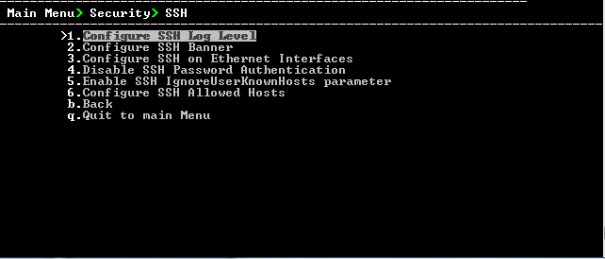
This menu includes the following options:
| ● | Configure SSH Log Level (SSH Log Level). |
| ● | Configure SSH Banner (SSH Banner). |
| ● | Configure SSH on Ethernet Interfaces (SSH on Ethernet Interfaces). |
| ● | Disable SSH Password Authentication (Enable/Disable SSH Password Authentication). |
| ● | Enable SSH Ignore User Known Hosts Parameter (Enable SSH Ignore User Known Hosts Parameter). |
| ● | Configure SSH Allowed Hosts (SSH Allowed Hosts). |