Connecting Device to IP Network through Optical Fiber
The device supports four optical network ports. Each port uses a pluggable SFP+ optical transceiver module, providing high-speed, long-distance network connectivity.
The following table shows the mapping of the port labels on the chassis to the port names in the device's management interfaces:
|
Port Label on Chassis |
Port Name in Management Interfaces |
|---|---|
|
9 |
GE_9 |
|
10 |
GE_10 |
|
11 |
GE_11 |
|
12 |
GE_12 |
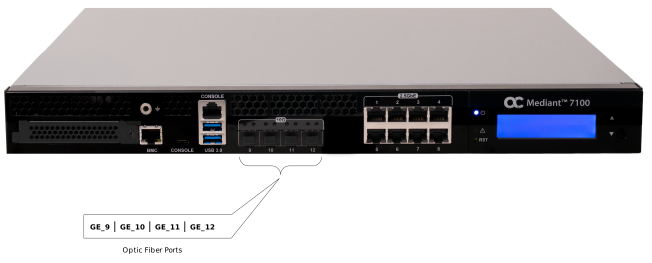
The optical transceiver modules must be ordered from AudioCodes. Use the catalog part numbers (CPNs) listed below to order the required modules:
| ● | FRU/M7K/SFP/10G/SR: |
| ✔ | Type: Short range (SR) |
| ✔ | Maximum distance: 300 m |
| ✔ | Supported speeds: 10 Gbps and 1 Gbps |
| ● | FRU/M7K/SFP/10G/LR: |
| ✔ | Type: Long range (LR) |
| ✔ | Maximum distance: 10 km |
| ✔ | Supported speeds: 10 Gbps |
Caution Laser: This device contains a Class 1 LED/Laser emitting device, as defined by 21CFR 1040 and IEC825. Do not stare directly into the beam or into fiber optic terminations as this can damage your eyesight.
Care in Handling Fiber Optic Cabling:
| ● | Excessive bending of the Fiber Optic Cable can cause distortion and signal losses. |
| ● | Ensure the minimum bending radius recommended by the Fiber Optic Cable supplier. |
| ● | Incoming optic cabling from the network infrastructure can originate from the top of the rack or from another shelf within the rack. Preserve the minimum-bending ratio indicated by the cable manufacturer. |
| ● | To ensure full high-availability capabilities, the configuration of the interface to the IP backbone must include certain redundant features from which two separate fiber optic cables are entering the device. |
| ➢ | To connect device to the optical fiber network: |
| 1. | Remove the protective dust plug from the SFP+ transceiver module. |
| 2. | Connect a cable with LX-type or SX-type plugs to the SFP+ transceivers. |