Connecting to Power
The device includes two Power Supply modules that operate in active-redundant mode. Each module is powered from an AC power source.
| ● | Both Power Supply modules (1 and 2) must be connected. Ensure that you connect each one to a different AC power supply source. Two Power Supplies provide 1+1 power load-sharing and redundancy. The AC power sockets are located on the device's rear panel. |
| ● | The two AC power sources must have the same ground potential. |
| ● | The device must be connected (by service personnel) to a socket-outlet with a protective earthing connection. |
| ● | Use only a certified 3-conductor power cord, supplied with the unit. |
To reduce the risk of electric shock or energy hazards:
| ● | This equipment must be installed by trained service personnel, as defined by the NEC and IEC 60950-1, Second Edition, the standard for Safety of Information Technology Equipment. |
| ● | Connect the equipment to a reliably grounded Secondary circuit source. A Secondary circuit has no direct connection to a Primary circuit and derives its power from a transformer, converter, or equivalent isolation device. |
| ● | The branch circuit overcurrent protection for DC power supply must be rated 27 A. |
| ➢ | To connect each Power Supply module to power source: |
| 1. | Turn off the AC power source supplying the module. |
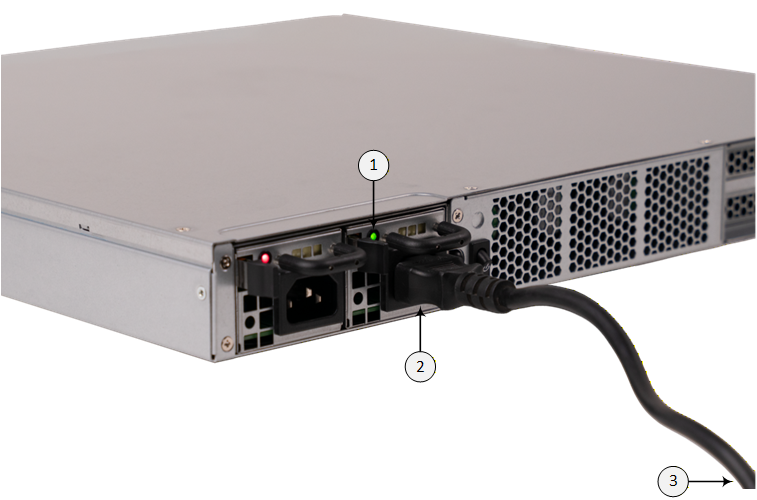
| 2. | Connect the power cord to the module's inlet (#2 in figure) and the wall outlet (#3 in figure). |
| 3. | Turn on the AC power source. |
| 4. | Verify that the module is receiving power: the module's LED should light green (#1 in figure) . |