Replacing a Faulty Power Supply Module
The device includes two Power Supply modules that operate in active-redundant mode. Each module is hot-swappable, allowing you to replace a faulty unit while the device remains powered by the other module.
If one of the Power Supply modules becomes faulty, replace it immediately. Do not operate the device with one Power Supply module.
Before removing a Power Supply module:
|
●
|
Disconnect the power cord from the module. |
|
●
|
After you've disconnected the power cord, wait at least three seconds for the capacitors to discharge. |
|
●
|
To prevent injury from hot surfaces, allow the module to cool. |
|
➢
|
To replace a Power Supply module: |
|
1.
|
Turn off the AC power source supplying the faulty module. |
|
2.
|
Unplug the power cord from the wall outlet. |
|
3.
|
Disconnect the power cord from the Power Supply module. |
|
4.
|
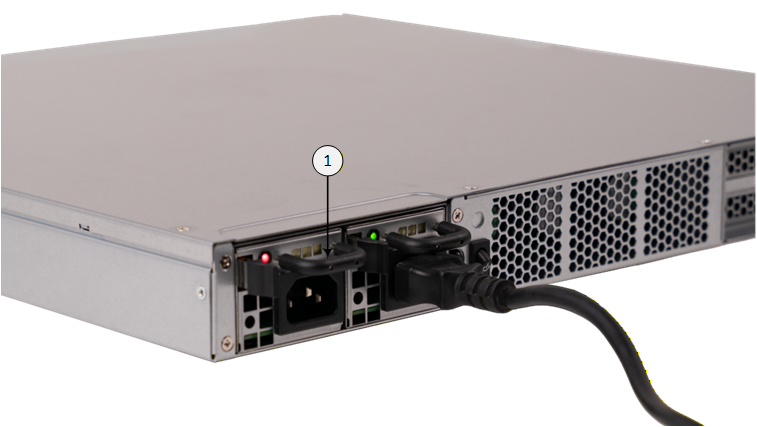
Hold the module's handle (indicated by #1 in the following figure) and gently pull it out of the chassis slot. |
|
5.
|
Insert the new Power Supply module into the same chassis slot. |
|
6.
|
Reconnect the power cord to the module's inlet and the wall outlet. |
|
7.
|
Turn on the AC power source. |
|
8.
|
Verify that the module is receiving power: the module's LED should light green. |