Configuring ACME Profiles
The ACME Profiles table lets you configure up to
After you configure an ACME profile, you need to do the following:
| 1. | If the ACME Profile uses DNS-01 as the challenge type with the DNS provider (see 'Challenge Type' parameter below), you need to do the following: |
| ● | Create a DNS-01 credentials file for the specific DNS provider (see Create the DNS-01 Credentials File). |
| ● | Upload the DNS-01 credentials file to the ACME Profile (see Upload the DNS-01 Credentials File to the ACME Profile). |
| 2. | Assign the ACME Profile to a TLS Context in the TLS Contexts table (see Configuring TLS Contexts). |
Notes for DNS-01:
| ● | Important security notice: |
The credentials used for DNS ownership validation must be restricted to the minimum permissions required. These credentials should have modification privilege access only to the specific DNS TXT record used for domain ownership verification and must not permit any other DNS modifications, creation, deletion, or updates of DNS records, zones, or any other DNS resources. Granting broader permissions creates unnecessary security risk and is strongly discouraged. Customers should work with their IT or DNS administrators to create dedicated, tightly scoped credentials that are limited exclusively to this validation task.
| ● | Notice about DNS providers: |
This solution has been validated and tested by AudioCodes using Microsoft Azure DNS as the DNS provider. While the referenced external documentation includes examples of using other DNS service providers, such services are provided as-is. AudioCodesdoes not certify, validate, or guarantee the functionality, compatibility, security, or operational behavior of any DNS provider other than Azure DNS. Customers choosing to use an alternative DNS service are responsible for verifying its suitability and ensuring that it meets their operational and security requirements.
The following procedure describes how to configure ACME Profiles through the Web interface. You can also configure it through ini file [ACMEProfiles] or CLI (configure network > acme-profile).
| ➢ | To configure an ACME Profile: |
| 1. | Open the ACME Profiles table (Setup menu > IP Network tab > Security folder > ACME Profiles). |
| 2. | Click New; the following dialog box appears: |
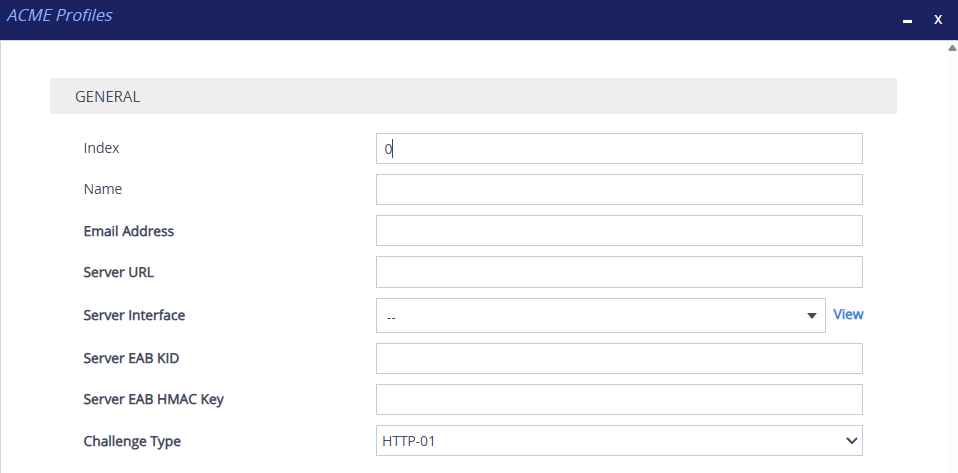
| 1. | Configure an ACME Profile according to the parameters described in the table below. |
| 2. | Click Apply, and then save your settings to flash memory. |
ACME Profiles Table Parameter Descriptions
|
Parameter |
Description |
||||||||||||||||||
|---|---|---|---|---|---|---|---|---|---|---|---|---|---|---|---|---|---|---|---|
|
'Index' [Index] |
Defines an index number for the new table record. Note: The index must be unique. |
||||||||||||||||||
|
'Name' name [ProfileName] |
Defines a name for the ACME Profile. The valid value is a string of up to 31 characters. Note: Each row must be configured with a unique name. |
||||||||||||||||||
|
'Email Address' email-address [EmailAddress] |
Defines the email address used to register the device's account with the ACME-compliant CA. By default, no value is defined. |
||||||||||||||||||
|
'Server URL' server-url [ACMEServerURL] |
Defines the URL of the ACME server. By default, no value is defined. |
||||||||||||||||||
|
'Server Interface' server-interface [ServerInterface] |
Assigns an IP Interface from the IP Interfaces table (see Configuring IP Network Interfaces) through which the device communicates with the ACME-compliant CA. By default, no value is defined. Note: The IP version (IPv4 or IPv6) of the ACME server's URL and the assigned IP Interface must match. |
||||||||||||||||||
|
'Server EAB KID' server-eab-kid [EABKid] |
Defines the External Account Binding (EAB) key identifier (KID), used together with the Server EAB HMAC key to bind the device's ACME account to an existing account at the CA. By default, no value is defined. |
||||||||||||||||||
|
'Server EAB HMAC' Key server-eab-hmac-key [EABHMACKey] |
Defines the External Account Binding (EAB) HMAC key, used together with the Server EAB KID to bind the device's ACME account to an existing account at the CA. By default, no value is defined. |
||||||||||||||||||
|
'Challenge Type' challenge-type [ChallengeType] |
Defines the validation method the device uses to prove domain ownership to the ACME-compliant CA.
To create the DNS-01 credentials file, see Create the DNS-01 Credentials File. To upload the file to the ACME Profile, see Upload the DNS-01 Credentials File to the ACME Profile. Note: DNS-01 is also required if you use wildcard domain names (e.g., *.example.com) in Subject Alternative Names (SAN). |
||||||||||||||||||
|
'DNS-01 Credentials Loaded' |
Read-only field that displays if you've uploaded a file with the DNS-01 credentials. Note:
To upload the DNS-01 credentials file, see Upload the DNS-01 Credentials File to the ACME Profile. |