Configuring Customized SIP Response Codes
The Custom SIP Reason Codes table lets you configure up to 100 customized textual descriptions (reason phrase) for SIP response codes. You can customize both:
| ■ | Standard SIP response codes, such as 200 "OK" |
| ■ | Non-standard or proprietary response codes, such as 452 "Block transfer" |
The device applies the customized response to the outgoing SIP response message.
For example, you can configure a Custom SIP Reason Codes rule to convert the incoming SIP response code 200 "OK" into the outgoing response 200 "Call Connected".
The SIP response code and its reason phrase can appear in the Request-URI line or the Reason header of the SIP response message, as shown in the following example:
SIP/2.0 452 Block transfer
Via: SIP/2.0/TCP 10.1.1.1:5060;alias;branch=z9hG4;rport=529;received=10.2.2.2
From: <sip:4011111@acme.com>;tag=1abcd12345
To: <sip:sue@example.com:5070>;tag=12245abcd.1234aa56
Call-ID: 12345678@10.1.1.1
CSeq: 1 REFER
Content-Length: 0
Reason: SIP ;cause=452 ;text=”Block transfer”
If no matching entry exists in the Custom SIP Reason Codes table, the device behaves as follows:
| ■ | Standard SIP response codes: The device forwards the response code unchanged with its standard, hard-coded reason phrase. |
| ■ | Non-standard SIP Response Codes: The device converts the response code into the nearest standard response code (x00). For example, the device converts 452 "Block transfer" into 400 "Bad Request". |
You can configure the device to forward the original SIP response code and reason phrase—both standard and non-standard—without conversion. To enable this functionality, use the [SBCPreserveReasonPhrase] ini file parameter. This option is useful for interoperability with third-party systems that rely on proprietary or non-standard SIP response codes (e.g., 452 "Block transfer").
| ● | The Custom SIP Reason Codes table takes precedence over all other configurations or default behavior that affect SIP response codes. |
| ● | You can also access or modify the SIP reason phrase by using the device’s SIP Message Manipulation feature (see Configuring SIP Message Manipulation). In your Message Manipulation rules, use the following syntax: header.Request-URI.ReasonPhrase. To use this functionality, you must enable the [SBCPreserveReasonPhrase] ini file parameter. For more information on message manipulation syntax, refer to the SIP Message Manipulation Syntax Reference Guide. |
The following procedure describes how to configure custom SIP response codes through the Web interface. You can also configure it through ini file [CustomSIPReasonCodes] or CLI (configure voip > sip-definition cust-sip-reason-codes).
| ➢ | To configure custom SIP reason codes: |
| 1. | Open the Custom SIP Reason Codes table (Setup menu > Signaling & Media tab > SIP Definitions folder > Custom SIP Reason Codes). |
| 2. | Click New; the following dialog box appears: |
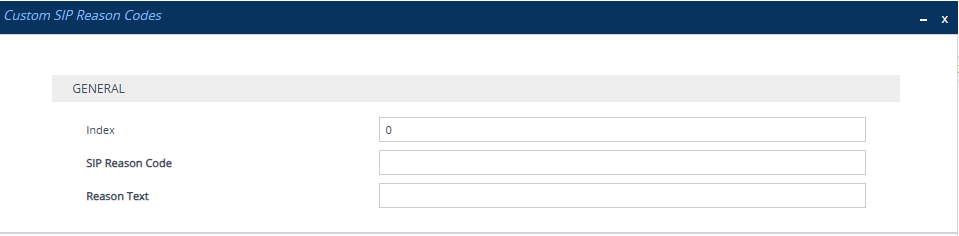
| 3. | Configure a custom response code according to the parameters described in the table below, and then click Apply. |
Custom SIP Reason Codes Table Parameter Descriptions
|
Parameter |
Description |
|---|---|
|
'Index' [Index] |
Defines an index number for the new table row. Note: Each row must be configured with a unique index. |
|
'SIP Response Code' sip-reason-code [SIPReasonCode] |
Defines the SIP response code. The valid value is a number between 100 and 699. |
|
'Reason Text' reason-text [ReasonText] |
Defines a textual description for the SIP response code. The valid value is a string of up to 100 characters. |