Enabling and Configuring TACACS+ Settings
Use the parameters in this section to control how the device authenticates and authorizes management users through a TACACS+ server:
|
■
|
Enabling the TACACS+ feature. |
|
■
|
Determining how the device assigns user access levels. |
|
■
|
Determining local-user (Local Users table) fallback upon various TACACS+ server conditions. |
|
■
|
Enabling TACACS+ accounting for user login and logout events. |
|
●
|
If you plan to use TACACS+ authorization that determines user access level, configure TACACS+ privilege-level to device access-level mappings, as described in Configuring TACACS+ Access Level Mapping. |
|
●
|
TACACS+ applies to the device's Web interface and CLI. |
|
➢
|
To configure TACACS+ settings: |
|
1.
|
Open the Authentication Settings page (Setup menu > Administration tab > Web & CLI folder > Authentication Settings). |
|
2.
|
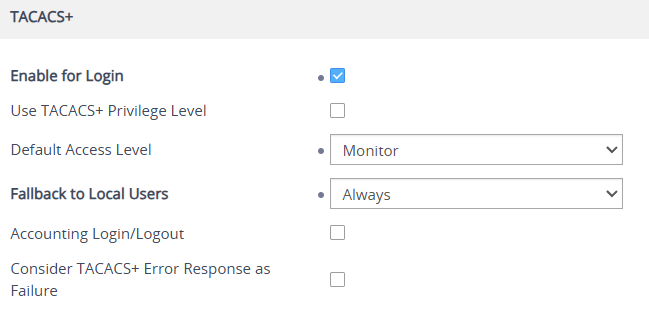
Scroll down to the TACACS+ group: |
|
3.
|
Enable TACACS+ login authentication:
|
Select the 'Enable for Login' check box.
|
4.
|
Configure user authorization and access-level assignment:
|
|
a.
|
Select the 'Use TACACS+ Privilege Level' check box to use the privilege level returned by the TACACS+ server. |
|
b.
|
If no matching between the TACACS+ privilege level and device user level exists in the TACACS+ Access Level Mapping table (or you disabled the 'Use TACACS+ Privilege Level' parameter above), configure the 'Default Access Level' parameter to assign one of the following user levels: |
|
5.
|
Configure local-user (Local Users table) fallback behavior:
|
From the 'Fallback to Local Users' drop-down list, select one of the following:
|
●
|
Never: Doesn't allow authentication through local user accounts if TACACS+ authentication fails. |
|
●
|
Upon TACACS+ Server Timeout: Allows authentication through local user accounts only if the TACACS+ server doesn't respond within the configured timeout period (see Configuring TACACS+ Servers). |
|
●
|
Always: Allows authentication through local user accounts when the TACACS+ server returns an ERROR response or is unable to process the authentication request. |
To configure local users in the Local Users table, see Configuring Local Management User Accounts.
|
6.
|
To generate TACACS+ accounting records for user sessions:
|
Select the 'Accounting Login/Logout' check box to enable the device to send accounting records to the TACACS+ server whenever a user logs in to or logs out of the Web interface or CLI.
|
7.
|
Configure the handling of TACACS+ server ERROR responses:
|
Select the 'Consider TACACS+ Error Response as Failure' check box to enable the device to handle received TACACS+ ERROR responses as authentication failures. If disabled, the device doesn't consider a TACACS+ ERROR response as an authentication failure and allows subsequent authentication processing according to the configured fallback policy.