Configuring TACACS+ Servers
The TACACS+ Servers table lets you configure up to two TACACS+ servers. You need to configure a TACACS+ server when you want to use TACACS+ for user authentication, authorization, and accounting.
You can configure two TACACS+ servers for 1:1 redundancy (active/redundant). If the primary server fails, the device uses the secondary server.
The TACACS+ server is configured using two tables with parent-child relationship:
| ■ | TACACS+ Servers table (parent): Defines settings to connect to the server such as address, port, shared secret, and local interface. The table is described below. |
| ■ | TACACS+ Access Level Mapping (child): Defines user access level mapping between TACACS+ privilege levels and the device's user levels (Security Administrator, Administrator, and Monitor). For more information, see Configuring TACACS+ Access Level Mapping. |
The following procedure describes how to configure TACACS+ servers through the Web interface. You can also configure it through ini file [TacacsPlusServers] or CLI (configure system > tacacs-settings > tacacsplus-servers).
| ➢ | To configure a TACACS+ server: |
| 1. | Open the TACACS+ Servers table (Setup menu > IP Network tab > AAA Servers folder > TACACS+ Servers). |
| 2. | Click New; the following dialog box appears: |
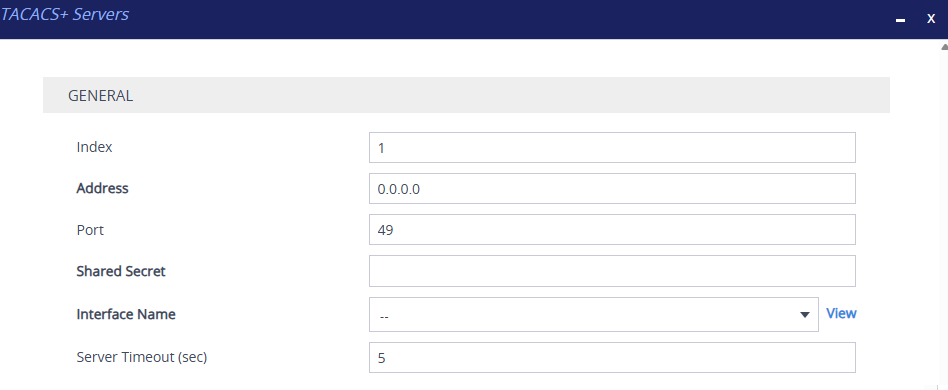
| 3. | Configure a TACACS+ server according to the parameters described in the table below. |
| 4. | Click Apply. |
| 5. | Save your settings to flash memory. |
TACACS+ Servers Table Parameter Descriptions
|
Parameter |
Description |
||||||
|---|---|---|---|---|---|---|---|
|
'Index' |
Defines an index number for the new table row. Note:
|
||||||
|
'Address' address [Address] |
Defines the address of the TACACS+ server. The address can be an IP address or an FQDN. By default, no address is defined (i.e., 0.0.0.0). Note: The IP version (IPv4 or IPv6) of the server address and the IP Interface must match. |
||||||
|
'Port' port [Port] |
Defines the TACACS+ server port. The valid value is 0 to 65535. The default is 49. |
||||||
|
'Shared Secret' shared-secret [SharedSecret] |
Defines the shared secret (password) for authenticating the device with the TACACS+ server. This should be a cryptically strong password. The shared secret is also used by the server to authenticate and verify TACACS+ messages sent by the device (i.e., message integrity). The valid value is a string of up to 48 characters. By default, no value is defined. Note: The password cannot include wide characters. |
||||||
|
'Interface Name' interface-name [InterfaceName] |
Assigns an IP Interface from the IP Interfaces table (see Configuring IP Network Interfaces) through which the device communicates with the TACACS+ server. By default, no value is defined. Note: The IP version (IPv4 or IPv6) of the server address and the IP Interface must match. |
||||||
|
'Server Timeout' server-timeout [ServerTimeout] |
Defines the maximum time (in seconds) that the device waits for a response from the TACACS+ server. If the device does not receive a response within this timeout, it marks the server as unreachable and attempts to connect to the secondary TACACS+ server (if configured). If the device still cannot establish connectivity with any TACACS+ server, it falls back to the Local Users table for authentication, depending on configuration (see the 'Fallback to Local Users' parameter). The valid value is 1 to 65535. The default is 5. |