Configuring TACACS+ Access Level Mapping
The TACACS+ Access Level Mapping table lets you configure up to three rules that map TACACS+ privilege (priv-lvl) values to the device’s user levels (Security Administrator, Administrator, and Monitor). For example, you can map TACACS+ priv-lvl=1 to the device’s Monitor user level.
The table is a child of the TACACS+ Servers table (see Configuring TACACS+ Servers).
| ● | If the TACACS+ Access Level Mapping table contains rules and a TACACS+ response includes a privilege level that is not listed in the table, the device rejects the user's login attempt to the web interface or CLI. |
| ● | If the table is empty, priv-lvl 15 maps to Security Administrator; all other values map according to the 'Default Access Level' parameter. |
The following procedure describes how to configure TACACS+ access level mapping through the Web interface. You can also configure it through ini file [TacacsPlusAccessLevelMapping] or CLI (configure system > tacacs-settings > tacacsplus-servers > access-levels).
| ➢ | To map a TACACS+ privilege level to the device's user levels: |
| 1. | Configure a TACACS+ server in the TACACS+ Servers table, as described in Configuring TACACS+ Servers. |
| 2. | In the TACACS+ Servers table, select the server you added. |
| 3. | Click the TACACS+ Access Level Mapping link located below the table; the TACACS+ Access Level Mapping table appears. |
| 4. | Click New; the following dialog box appears: |
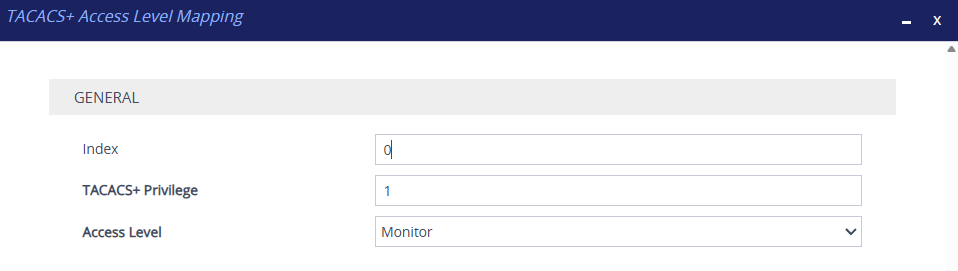
| 5. | Configure a TACACS+ Access Level Mapping rule according to the parameters described in the table below. |
| 6. | Click Apply. |
| 7. | Save your settings to flash memory. |
TACACS+ Access Level Mapping Table Parameter Descriptions
|
Parameter |
Description |
|||||||||
|---|---|---|---|---|---|---|---|---|---|---|
|
'Index' [AccessLevelMappingId] |
Defines an index number for the new table row. Note:
|
|||||||||
|
'TACACS+ Privilege' privilege-level [Privilege] |
Defines the TACACS+ privilege level (priv-lvl) that you want mapped to the specific device's user level. The valid value is 1 to 15. The default is 1. Note: The parameter is mandatory. |
|||||||||
|
'Access Level' access-level [AccessLevel] |
Defines the device's user level that you want mapped to the specific TACACS+ privilege level.
|