Change Default Login Passwords
To secure access to the device's Web management interface, please adhere to the following recommended guidelines:
|
■
|
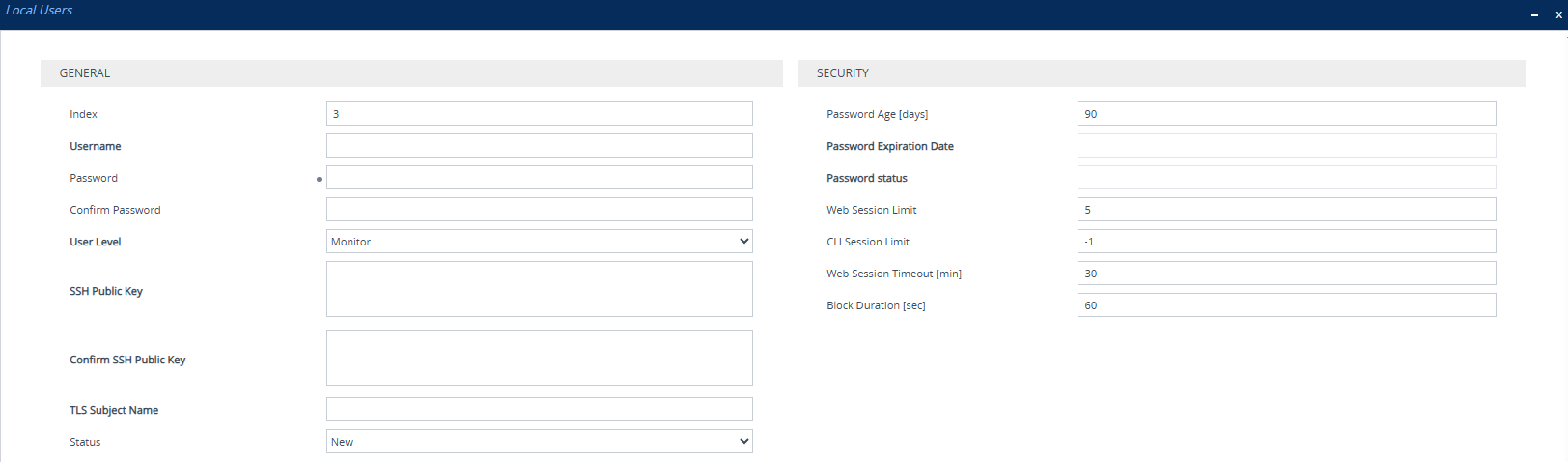
The device is shipped with a default Security Administrator access-level user account with username Admin and password Admin. This user has full read-write access privileges to the device. It's recommended to change this default password to a hard-to-hack string. You can change the username and password in the Local Users table (Setup menu > Administration tab > WEB & CLI folder > Local Users): |
|
■
|
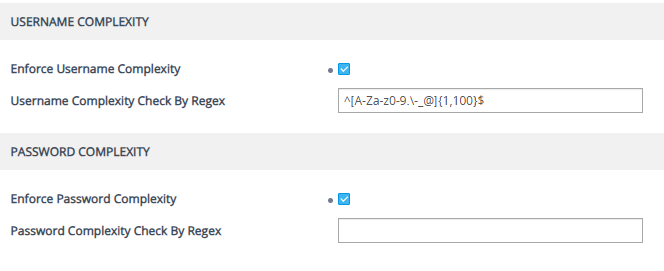
Enforce username and password complexity. Instead of using the device's default complex policy, you can configure a customized complex policy based on a regular expression (regex). Username and password complexity are configured on the Local Users Settings page (Setup menu > Administration tab > WEB & CLI folder > Local Users Settings): |
|
■
|
The device is shipped with a default Monitor access-level user account with username User and password User. This user has read-only privileges to the device. The read access privilege is also limited to certain Web pages. However, this user can view certain SIP settings such as proxy server addresses. Therefore, to prevent an attacker from obtaining sensitive SIP settings that could result in possible call theft etc., either delete this user account or change its default login password to a hard-to-hack string. |
|
■
|
If you have deployed multiple devices, use a unique password for each device. |
|
■
|
Change the login password periodically (e.g., once a month). It's recommended to configure users with a password age. This is done in the Local Users table ('Password Age' parameter). |