Configuring Label Names for Window Tabs
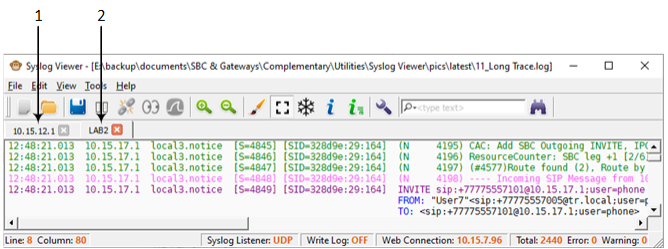
By default, Syslog Viewer displays the IP address of the device on the window tab. Instead of an IP address, you can configure any string label for a device (defined by IP address).
The following figure shows two window tabs, one displaying a device's IP address (#1) and another displaying a device's label (#2):
|
➢
|
To configure window tab labels per device: |
|
1.
|
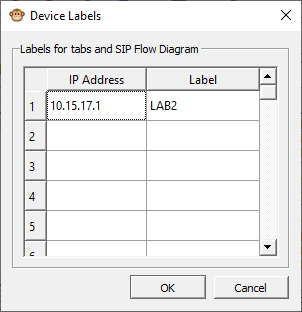
From the Tools menu, choose Device Labels; the following dialog box appears: |
|
2.
|
Click the 'IP Address' field, and then enter the IP address of the device. |
|
3.
|
Click the corresponding 'Label' field, and then enter a label (string) for the device. |
|
4.
|
Click on any other row, and then click OK. |
You can also rename a specific window tab directly:
|
1.
|
Right-click the window tab, and then from the shortcut menu, choose Rename Tab. |
|
2.
|
Type a new name for the tab, and then click OK. |