Rotating Written Syslog Files
When you write syslog messages to a file (see Writing Real-time Syslog Messages to File), Syslog Viewer implements a file rotation mechanism.
In file rotation, when the file to which Syslog Viewer is currently writing (current file) reaches a user-defined size (in Mbytes), it stops writing to the file, saves it with a different name, and then immediately starts writing to a newly created file with the same original filename. Syslog Viewer renames rotated (old) files using a sequential index, which is added to the file's original name (<filename>_<seq. no.>.txt).
The following example explains file rotation and assumes that you have named the file syslog-sbc.txt:
|
1.
|
First written (current) file: syslog-sbc.txt. |
|
2.
|
First file rotation: Syslog Viewer stops writing to syslog-sbc.txt, renames it syslog-sbc_0000.txt, and then starts writing to a newly created file called syslog-sbc.txt. |
|
3.
|
Second file rotation: Syslog Viewer stops writing to syslog-sbc.txt, renames it syslog-sbc_0001.txt, and then starts writing to a newly created file called syslog-sbc.txt. |
|
4.
|
Third file rotation: Syslog Viewer stops writing to syslog-sbc.txt, renames it syslog-sbc_0002.txt, and then starts writing to a newly created file called syslog-sbc.txt. |
You can also define the maximum number of rotated files. When the total number of rotated files exists, Syslog Viewer performs file rotation from the beginning. For example, assume that you have configured the maximum number of files to 2 and the current file is syslog-sbc.txt:
|
1.
|
First written (current) file: syslog-sbc.txt. |
|
2.
|
First file rotation: Syslog Viewer stops writing to syslog-sbc.txt, renames it syslog-sbc_0000.txt, and then starts writing to a newly created file called syslog-sbc.txt. |
|
3.
|
Second file rotation: Syslog Viewer stops writing to syslog-sbc.txt, renames it syslog-sbc_0001.txt, and then starts writing to a newly created file called syslog-sbc.txt. |
|
4.
|
Third file rotation: Syslog Viewer stops writing to syslog-sbc.txt, renames it syslog-sbc_0000.txt (overwriting syslog_0000.txt in Step 2, and then starts writing to a newly created file called syslog-sbc.txt. |
The current file (to where syslog messages are currently written) always has the original filename that you specified (e.g., syslog-sbc.txt).
|
➢
|
To configure log file rotation: |
|
1.
|
On the toolbar, click the Options  icon; the Options dialog box appears. icon; the Options dialog box appears. |
|
2.
|
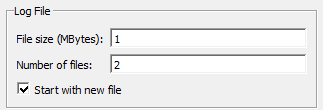
Under the Log File group, configure the following: |
|
●
|
In the 'File size' field, enter the size of the file (in Mbytes) after which file rotation occurs. |
If you configure 'File size' to 0, file rotation is disabled and the current (initial) file increases endlessly.
|
●
|
In the 'Number of files’ field, enter the maximum number of rotated files. |
If you configure 'Number of files' to 0, the number of rotated files is unlimited. Instead of a sequential index, a timestamp (YYYY-MM-DD_HH-MM-SS-MSC, where MSC is msec) is used in the filename (e.g., syslog-sbc_2023-07-27_14-40-25-843.txt).
|
●
|
If you want the current file (e.g., syslog-sbc.txt) to be rotated whenever you click the Write Log  icon, select the 'Start with new file' check box. icon, select the 'Start with new file' check box. |