Copying to Clipboard the SID, SIP URI From, or SIP URI To
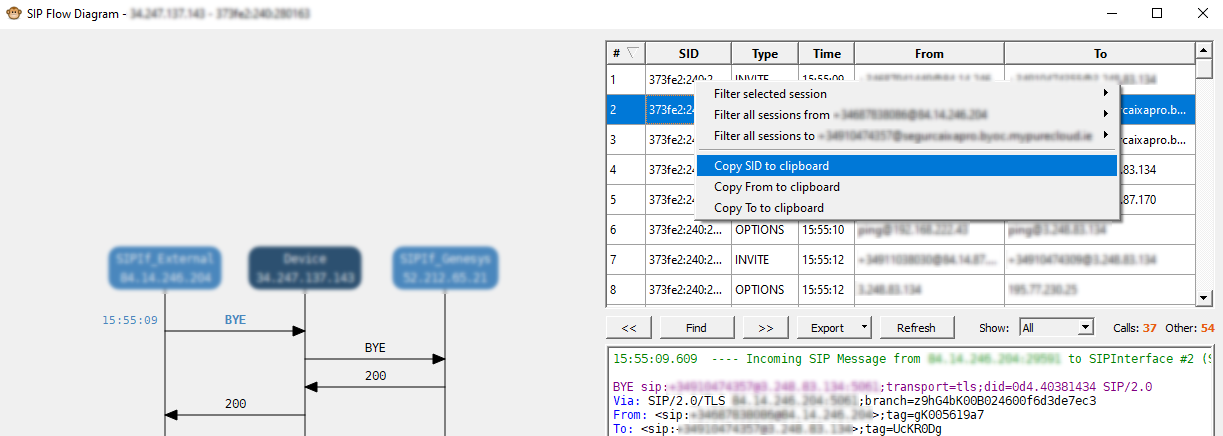
In the SIP Flow Diagram window, you can copy to your clipboard the session ID (SID), SIP URI of the From header, or SIP URI of the To header. You can then paste these values in, for example, Notepad or an email.
|
➢
|
To copy to clipboard the SID, From SIP URI, or To SIP URI: |
|
1.
|
In the Session pane of the SIP Flow Diagram window, right-click the desired SIP session row, and then from the pop-up menu, choose one of the following: |
|
●
|
Copy SID to clipboard: Copies to clipboard the session ID. |
|
●
|
Copy From to clipboard: Copies to clipboard the SIP URI of the From header. |
|
●
|
Copy To to clipboard: Copies to clipboard the SIP URI of the To header. |
|
2.
|
Paste the copied item into an application (e.g., Notepad or an email). |