Filtering Display by Session ID
You can use the SIP Call Flow diagram to filter the syslog message window by session ID, SIP URI of From header, or SIP URI of To header.
|
➢
|
To filter syslog message window by session ID: |
|
1.
|
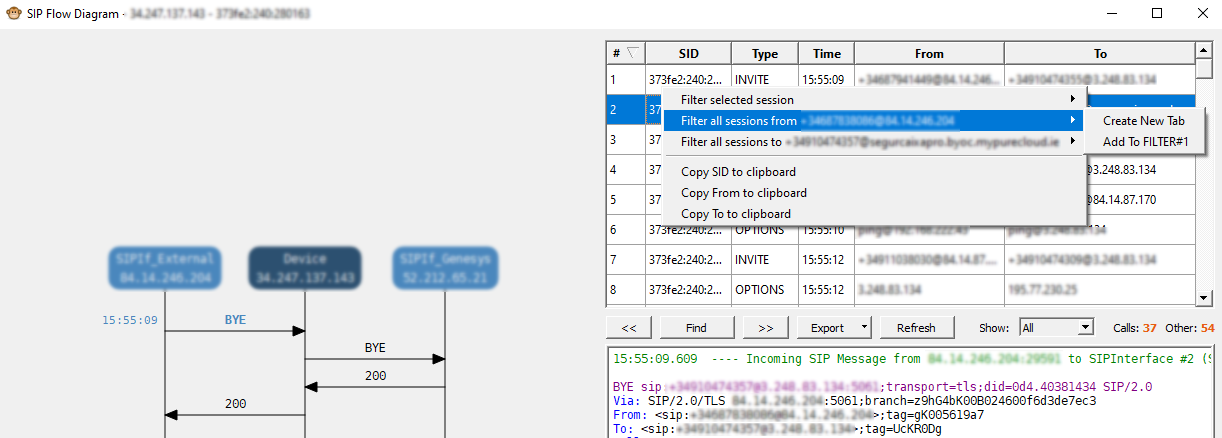
In the Session pane of the SIP Flow Diagram window, right-click the desired SIP session row, and then from the pop-up menu, choose one of the following: |
|
●
|
Filter selected session: Filters the syslog message window according to the session ID (SID) of the selected row. |
|
●
|
Filter all sessions from <SIP URI in From header>: Filters the syslog message window according to the specific SIP URI of the From header. |
|
●
|
Filter all sessions to <SIP URI in To header>: Filters the syslog message window according to the specific SIP URI of the To header. |
|
2.
|
When selecting the filter type (previous step), you can choose whether to create a new tab in the syslog message window for your filtered syslog messages, or add the filter to an existing tab. |