Monitor Alarms
The Alarms page lets you monitor active alarms raised on your managed endpoints. Based on these alarms, you can correct failures before users encounter them, maintaining high productivity and business without interruption.
The alarms data is synchronized in the Live Platform Active Alarm pages.
| ➢ | To monitor alarms: |
| ■ | Open the Alarms page (Monitor > Alarms) or click the Notification icon  in the right part of the Device Manager menu bar. in the right part of the Device Manager menu bar. |

You can:
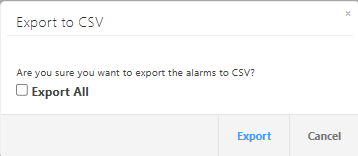
| ■ | Click the Export button to export the listed alarms to a CSV file. If you select Export All, all alarms are exported, not only the displayed alarms. |
| ■ | Click the Reload button to refresh the alarm list. |
| ■ | Click the Filter button to filter the display by most of the parameters below. By default, the display lists only alarm, but you can set the filter to display events as well. In addition, you can set the maximum number of search results to be displayed on a page. |
| ■ | Click the Actions link > Delete Alarm next to an alarm to delete it. The deleted alarm disappears from the Alarms page. |
The following table describes the parameters in this page.
|
Parameter |
Description |
|||||||||||||||
|---|---|---|---|---|---|---|---|---|---|---|---|---|---|---|---|---|
|
Severity |
Alarm severity, one of the following:
|
|||||||||||||||
|
Received Time |
The date and time when the alarm is raised. |
|||||||||||||||
|
Entity Name |
The MAC address of the device. Clicking the |
|||||||||||||||
|
Source |
Alarm source is identified by its device type, peripheral and MAC address. |
|||||||||||||||
|
Alarm Name |
The name of the raised alarm. |
|||||||||||||||
|
Description |
Alarm description |
|||||||||||||||
|
Service Provider |
The name of the Service provider attached to the service. |
|||||||||||||||
|
Service |
The name of the Device Manager service upon which the alarm is raised. |
|||||||||||||||
|
Customer |
The name of the customer managing the Device Manager service upon which the alarm is raised. |
|||||||||||||||
|
Info |
Alarm Additional Info (tgTrapGlobalsAdditionalInfo fields) |
|||||||||||||||
|
Remote Host |
IP address of the remote host |
|||||||||||||||
|
Last Action Time |
The last time an action was performed on the endpoint. |
 icon next to the MAC address opens the Device Info page on its Alarms tab.
Devices send alarms via the REST protocol. They're forwarded by Live Platform as mail, SNMP traps, etc.