Delete a Meeting Insights Tenant
You can delete a tenant from the Meeting Insights service.
| ➢ | To delete a tenant from Meeting Insights service: |
| 1. | Open the Customers page (Network > Customers). |
| 2. | Select the customer to remove, and then click Delete; the Tenant Management portal of Meeting Insights opens, displaying the Delete Meeting Insights Tenant form: |
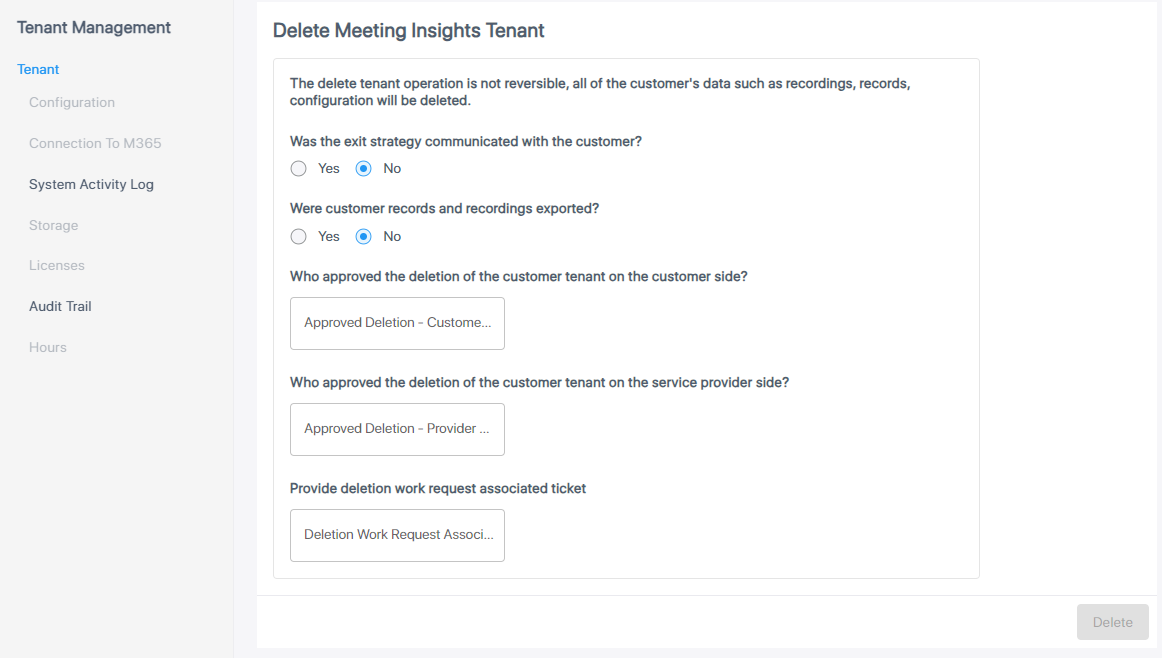
| 3. | Fill in the form using the table below as reference. |
|
Parameter |
Description |
||||||
|---|---|---|---|---|---|---|---|
|
Was the exit strategy communicated with the customer? |
Note: Deletion will only be allowed if you select Yes for this parameter and for the next parameter. Reconfirm that the customer is aware of the pending deletion and that they've exported recordings if it was agreed to wait for recordings to be exported before the deletion. |
||||||
|
Were customer records and recordings exported? |
Note: Deletion will only be allowed if you select Yes for this parameter and for the previous parameter. Reconfirm that the customer is aware of the pending deletion and that they've exported recordings if it was agreed to wait for recordings to be exported before the deletion. |
||||||
|
Who approved the deletion of the customer tenant on the customer side? |
Click inside the 'Approved Deletion - Customer Side' field and then enter the name of the customer admin who approved the deletion. |
||||||
|
Who approved the deletion of the customer tenant on the service provider side? |
Click inside the 'Approved Deletion - Provider Side' field and then enter the name of the Service Provider admin who approved the deletion. |
||||||
|
Provide deletion work request associated ticket |
Click inside the 'Deletion Work Request Associated Ticket' and then enter the ticket associated with the deletion request. |
| 4. | Make sure you select Yes for the first two parameters. |
| 5. | Click Delete; a confirmation message appears: |
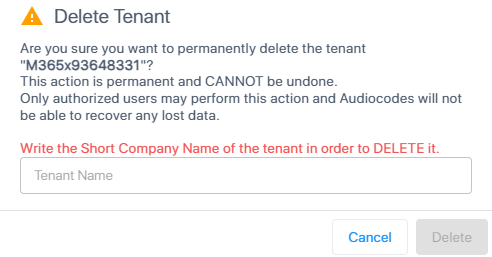
| 6. | In the field, enter the Short Company Name of the tenant. |
| 7. | click Delete; a progress message appears, informing you that Live Platform is deleting the tenant from the Meeting Insights service. |
| 8. | Make sure the customer is no longer listed under the Current Tenants on the Tenants page of the Tenant Management portal. |