Filtering by time range
The Time Range filter allows you to filter data according to a specified time range.
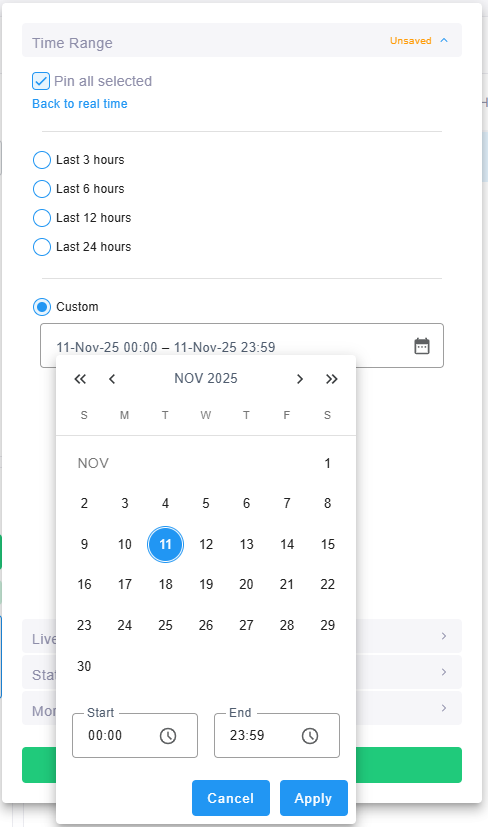
The Time Range filter displays Real Time by default. Click the filter and select one of the following:
|
■
|
Real Time: Displays current data (no time filter). |
|
■
|
Last period: Select 3 hours, 6 hours, 12 hours, 24 hours, 7 days, 1 month or 1 year. |
|
■
|
Custom: In the calendar, select the start and end dates and times, and then click Apply. |
When a time range is selected, use the arrows next to the range to move the time window back or forward by its own length. To remove the time filter, select Real Time or click Clear filters in the Filters panel. For more information, see Working with filters.
|
●
|
There is no limitation on the time you can define. |
|
●
|
If you define a time range of up to (and including) six hours, Live Platform calculates and displays in the page, a summation of all statistics calculated for all five-minute intervals in the range. The interval that is processing when you define the filter will not be included in the calculation. Only complete five-minute intervals will be included in the calculation. |
|
●
|
If you define a time range of between six and 48 hours, it calculates and display in the page a summation of all statistics calculated for all one-hour intervals in the range. The interval that is in process when you define the filter will not be included in the calculation. Only complete one-hour intervals will be included in the calculation. |
|
●
|
If you define a time range of more than 48 hours, it calculates and displays in the page a summation of all statistics calculated for all one-day intervals in the range. The interval that is in process when you define the filter will not be included in the calculation. Only complete one-day intervals will be included in the calculation. |