Record a Teams Webinar or Town Hall Event
You can record a Microsoft Teams Webinar or Town Hall event in one of the following ways:
|
■
|
Schedule the event with Meeting Insights Mia bot through your Teams calendar. |
|
■
|
Add the Meeting Insights Mia bot to a scheduled event that's already started. |
|
●
|
You can't forward email invitations for Webinar or Town Hall events. |
|
●
|
The Meeting Insights Side Panel isn't supported for Webinar or Town Hall events. |
|
➢
|
To initiate the recording of a Teams Webinar or Town Hall event: |
|
1.
|
Do one of the following: |
|
●
|
Schedule an event with Mia bot:
|
|
i.
|
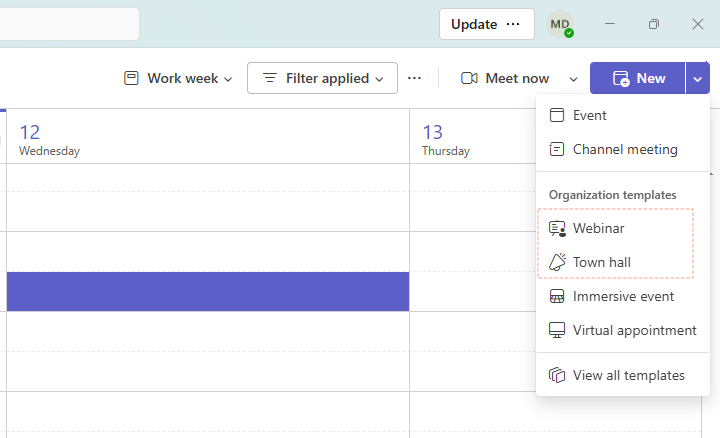
In Teams Calendar, add a new event: |
|
ii.
|
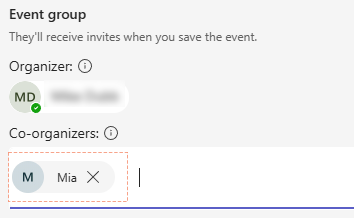
Add the Mia bot as the co-organizer of the event: |
|
iii.
|
Fill out the remaining event details, such as the title, date, and time, and then save the event. |
|
●
|
Add Mia bot to a scheduled event that's already started:
|
|
i.
|
Copy the event URL: In the active Teams window of the event, click More (...) on the top control bar, select Meeting info, and then click the Copy icon. |
|
ii.
|
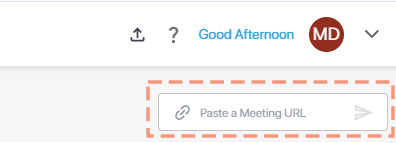
In your Meeting Insights meeting recordings list, past the URL in the 'Paste a Meeting URL' box: |
Depending on the event's settings, you may need to admit the Mia bot into the event.
|
2.
|
When the event starts, click Start meeting to begin recording.
|
|
3.
|
When the event ends, click End event to stop recording. |