Record an Invited or Scheduled Webex Meeting
If you have received a Webex meeting invitation, you can get Meeting Insights to record it, by forwarding the meeting to Meeting Insights Mia. When the Webex meeting starts, Mia joins automatically.
| ● | For Webex meetings that are initiated by a person in your organization (i.e., internal meeting): |
| ✔ | The meeting is recorded (invitation accepted by Mia) only if the organizer of the meeting has permission to record Webex meetings (enabled by your Administrator), regardless of who sent the invitation. |
| ✔ | The organizer of the meeting is the Owner. |
| ✔ | All invitees in your organization have access to the recorded meeting. |
| ✔ | Participants not originally invited to the meeting can access the recorded meeting only if it's shared with them by the organizer. |
| ● | For Webex meetings that are initiated by a person outside of your organization (i.e., external meeting): |
| ✔ | The meeting is recorded (invitation accepted by Mia) only if at least one of the invitees in your organization is a Meeting Insights user that has permission to record Webex meetings (enabled by your Administrator). |
| ✔ | All invitees in your organization that have permission to record Webex meetings can forward the invitation and have Owner permission; the remaining invitees have view permission only. |
| ➢ | To recorded an invited or scheduled Webex meeting: |
| 1. | In your Outlook Calendar, open the Webex meeting invitation. |
| 2. | From the Meeting menu ribbon, choose Forward. |
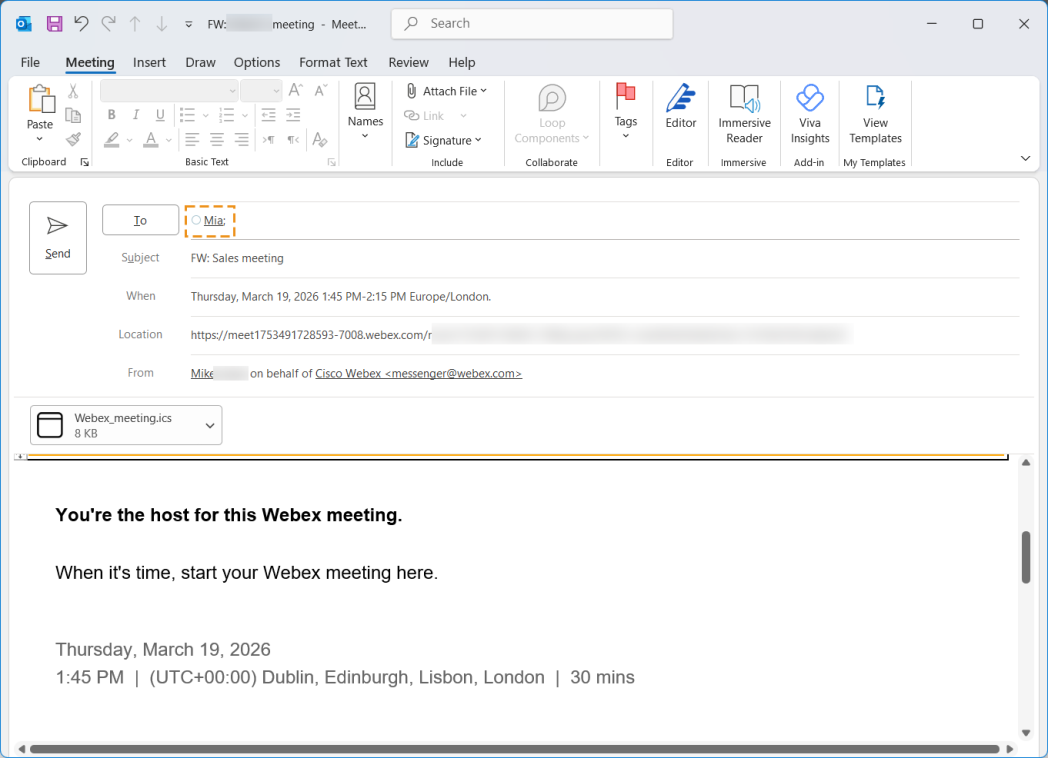
| 3. | In the To field, add the Meeting Insights "Mia" contact (see figure), and then clickSend: |