Supported Endpoints for Interaction Insights Integration
Integration API endpoints represent actions similar to those performed in the UI. When an action is applied to a list of items, the endpoint supports sorting and filtering. It also includes pagination and allows limiting the number of returned items.
In this release, the following GET endpoints are available, depending on the tenant setup:
|
API Endpoints |
Description |
Equivalent in UI |
|---|---|---|
|
Recording permissions: List recordings and recording metadata |
||
|
/recordings |
Get metadata (details) of recordings, including links to the Azure storage from which the media can be played back. Note: The API does not retrieve media directly. |
Interactions page |
|
/recordings/{id} |
Get metadata of a specified recording |
Interaction |
|
Recording permissions: Get recording transcript |
||
|
/recordings/{id}/transcript |
Get transcription content (VTT format) for a specified recording. Note: This API is only available if the Transcription feature is enabled on the tenant. |
Interaction with transcription |
|
Monitoring permissions: Audit Trail and Activity Logs |
||
|
/auditLogs |
Get user audit trail logs. |
Audit Trail page |
|
/systemActivityLogs |
Get system activity logs. Note: Log descriptions might differ from the UI descriptions and are available in English only. |
System Activity page |
|
/apiActivityLogs |
Get API activity logs. |
API Activity Logs page |
| ➢ | To use the API: |
| 1. | Authenticate using an application with the required permissions scope (see Add Applications). |
| 2. | Run the API request with the relevant sorting, filtering, and pagination options. |
Syntax
To run the requests, append them to the base endpoint URL of your tenant. This URL can be copied from the API Configuration page.
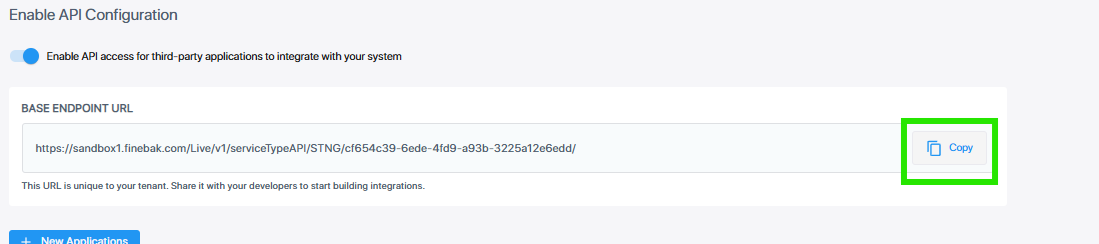
A request to run an API is structured as follows:
<Base endpoint URL>/api/integration/v1/<endpoint name>
For example:
https://insights.contoso.com/Live/v1/serviceTypeAPI/STNG/cf654c39-6ede-4fd9-a93b-3225a12e6edd//api/integration/v1/recordings