Configure API Applications
API applications manage access to the relevant endpoints of the integration API. When an application is created, it is assigned a Client ID and a Client Secret for authentication. The application also defines which endpoints it is permitted to access.
Applications are generated and managed from the API Configuration page. From this page, you can:
| ■ | Add Applications |
| ■ | View Application Details |
| ■ | Edit Permissions of an Application or its Description |
| ■ | Regenerate the Secret of an Application |
| ■ | Disable or Re-enable Applications |
| ■ | Delete an Application |
| ➢ | To access the API Configuration page: |
| ■ | In the Icon pane, click  , and then in the Navigation pane, select Integration> API Configuration. , and then in the Navigation pane, select Integration> API Configuration. |
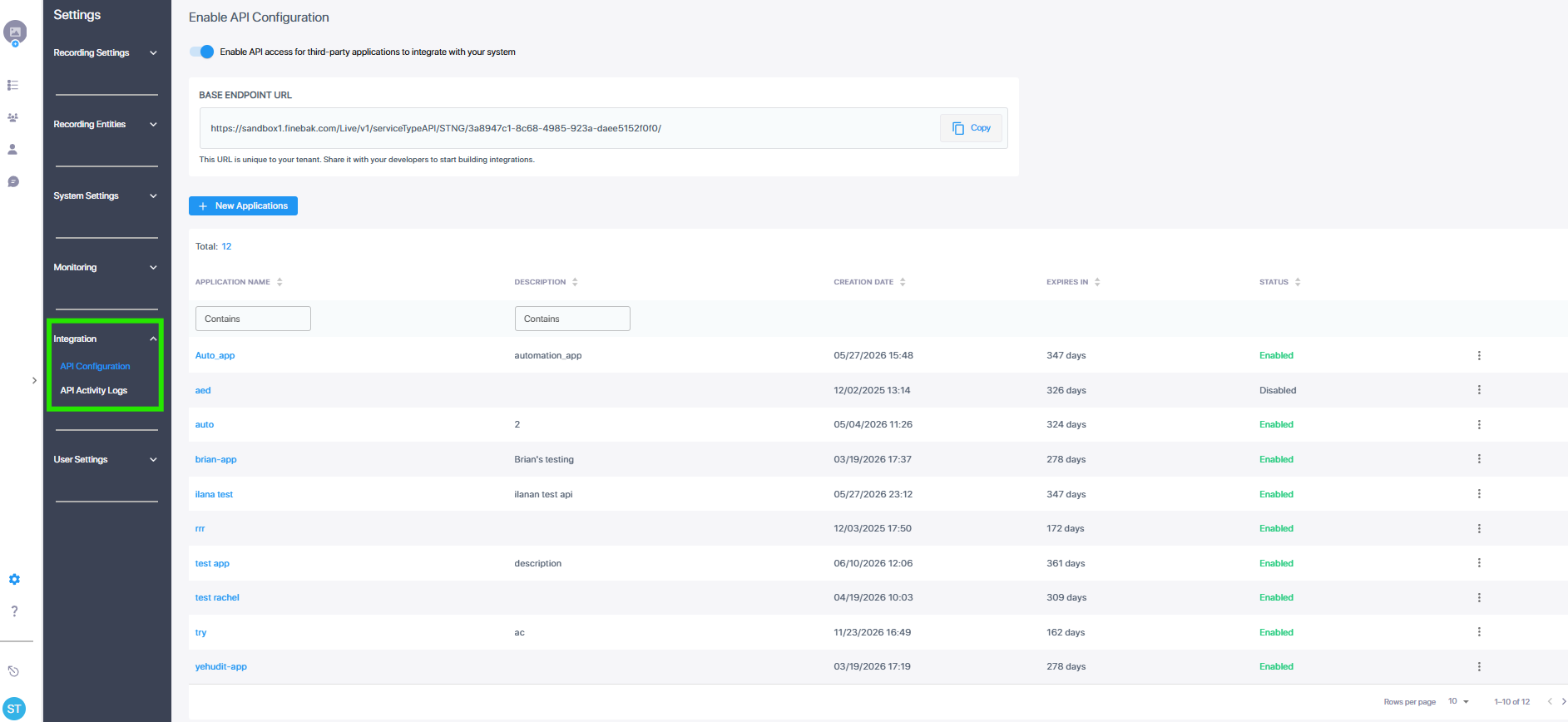
Below is a description of the parameters specified in the API Configuration table. You can sort this table by any of them, or filter by Name or Description.
|
Field |
Description |
||||||
|---|---|---|---|---|---|---|---|
|
Application Name |
The unique of the application. |
||||||
|
Description |
Description of the application. |
||||||
|
Creation Date |
The date and time the application was created. |
||||||
|
Expires in |
The number of days left until the expiration date of the application. |
||||||
|
Status |
Either of the following:
|