Analytics Profiles
An Analytics Profile configures the capability for Teams recordings to be transcribed and AI-powered summaries to be generated from the transcriptions. It is assigned to Recording Profiles and applies to Microsoft Entra ID (AAD) user groups associated with those profiles. For systems supporting SIPREC recordings, it provides transcription capabilities for recordings of associated devices.
Each analytics profile includes the following capabilities:
| ■ | Determines whether transcription and subsequent AI summary generation occurs automatically at the end of the recording, or must be manually triggered by authorized users. |
| ■ | Specifies the transcription / AI summary language, and for manual transcription, the languages that can be selected. |
| ■ | Defines whether profane language, if present, should be spelled out. |
| ■ | Defines the AI summary template. |
See also:
| ■ | Add an Analytics Profile |
| ■ | View or Modify an Analytics Profile |
| ■ | Delete an Analytics Profile |
| ➢ | To access the Analytics Profile page: |
| ■ | In the Icon pane, click  , and then in the Navigation pane, select Recording Settings > Analytics Profile. , and then in the Navigation pane, select Recording Settings > Analytics Profile. |
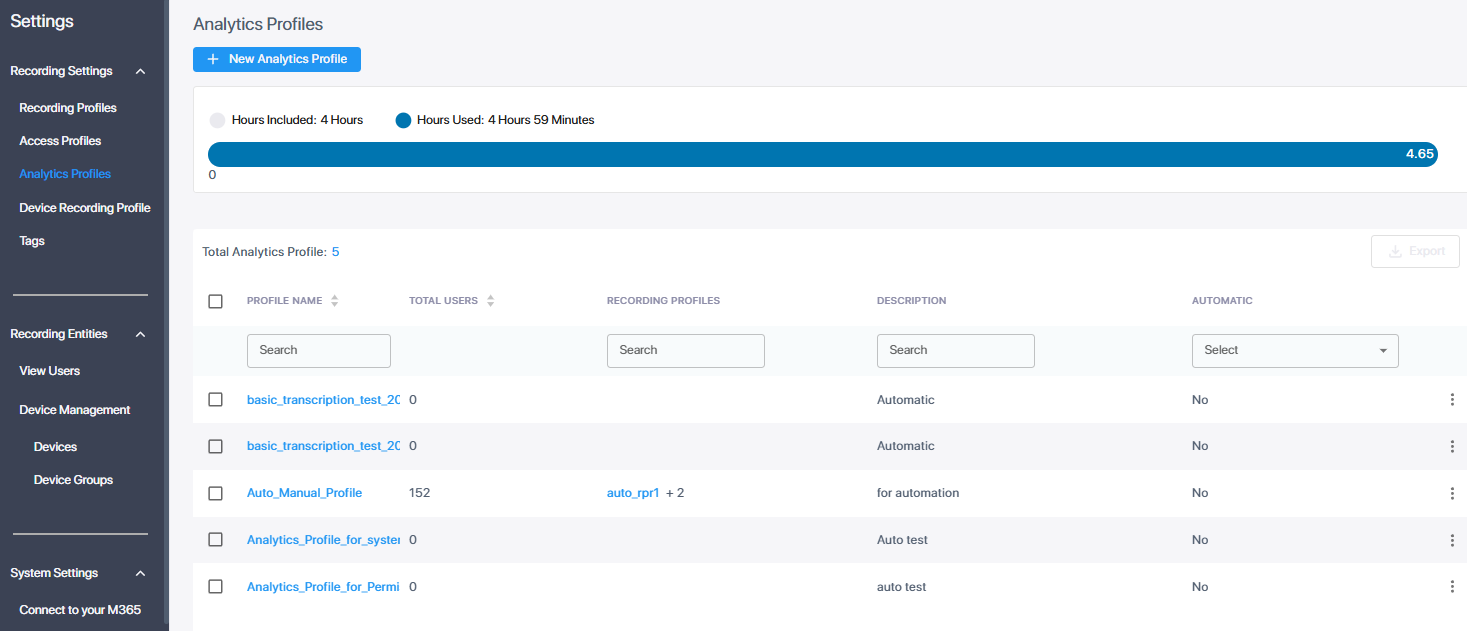
| ● | The upper part of the page displays a bar indicating transcription hours allowed compared to hours used. |
| ● | Below is a description of the parameters specified in the Analytics Profile table. You can sort this table by Profile Name or by Total Users. |
|
Field |
Description |
||||||
|---|---|---|---|---|---|---|---|
|
Profile Name |
The name of the analytics profile. |
||||||
|
Total users |
The total number of users and devices for which transcription is enabled by the analytics profile.
|
||||||
|
Recording Profiles |
The recording profiles and/or device recording profiles to which the analytics profile is assigned. |
||||||
|
Description |
Description of the profile. |
||||||
|
Automatic |
Either of the following:
|