Device Recording Profiles
A Device Recording Profile configures the SIPREC recording capabilities of SIP devices belonging to a Device Group mapped to that profile.
The device recording profile includes the following capabilities:
| ■ | Determines which call types may be recorded – incoming calls, outgoing calls, or both. |
| ■ | Sets the Data Retention period. |
| ■ | Configures the Azure Blob Storage region location to store calls. |
| ■ | If assigned an Analytics profile, enables transcription of recordings, and optionally generating of AI-powered summaries from these transcriptions. |
A device recording profile may be assigned to one or more device groups.
See also:
| ■ | Add a Device Recording Profile |
| ■ | View or Modify a Device Recording Profile |
| ■ | Disable a Device Recording Profile |
| ■ | Delete a Device Recording Profile |
| ➢ | To access the Device Recording Profile page: |
| ■ | In the Icon pane, click  , and then in the Navigation pane, select Recording Settings > Device Recording Profile. , and then in the Navigation pane, select Recording Settings > Device Recording Profile. |
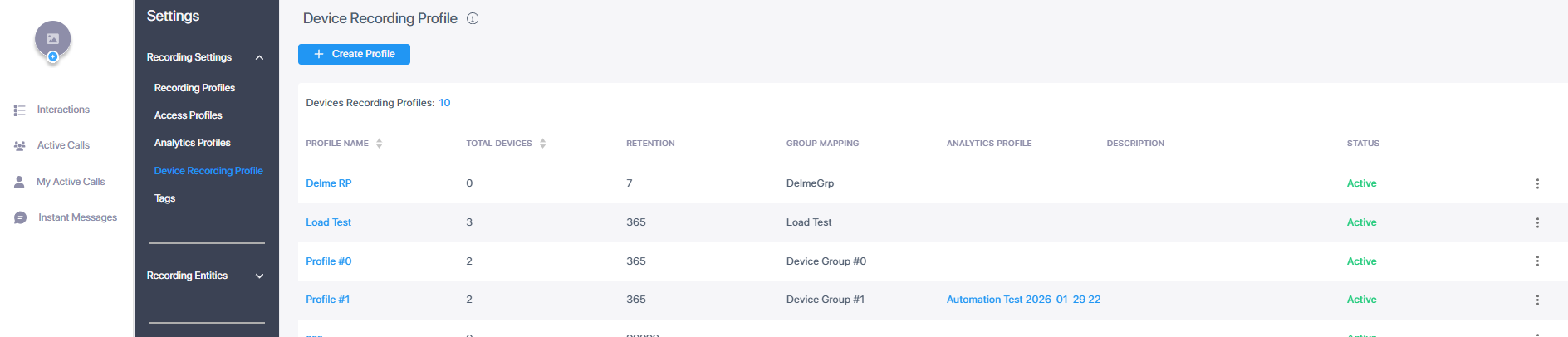
Below is a description of the parameters specified in the Device Recording Profile table. You can sort this table by Profile Name or by Total Devices.
|
Field |
Description |
||||||
|---|---|---|---|---|---|---|---|
|
Profile Name |
The name of the device recording profile. |
||||||
|
Total Devices |
The total number of devices linked to the profile via Device Groups (see Manage Device Groups). |
||||||
|
Retention |
Retention time period in days for calls associated with the profile. Default: One year. |
||||||
|
Group Mapping |
Device group or groups that are mapped to this profile. |
||||||
|
Analytics Profile |
Analytics profile associated with the profile (required for transcription). |
||||||
|
Description |
Description of the profile. |
||||||
|
Status |
Either of the following:
|