Viewing Retention Period of Meeting Recording
You can view the retention period of a meeting recording. This includes the retention period for media, transcription, and AI-generated insights.
|
➢
|
To view meeting recording's retention period: |
|
1.
|
In the Navigation pane, click  All meetings. All meetings. |
|
2.
|
Click the name of the meeting recording that you want; the Player page appears. |
|
3.
|
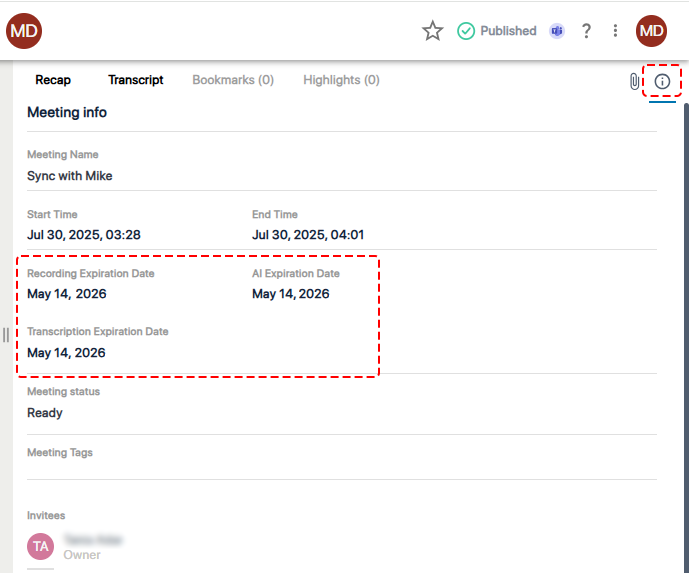
Click the  icon; the Meeting Info appears, displaying the different retention periods: icon; the Meeting Info appears, displaying the different retention periods: |
|
●
|
Recording Expiration Date: Displays the date (retention period) after which Meeting Insights will automatically delete the media (audio and video) of the meeting recording. |
|
●
|
AI Expiration Date: Displays the date (retention period) after which Meeting Insights will automatically delete the AI-generated insights of the meeting recording. |
|
●
|
Transcription Expiration Date: Displays the date (retention period) after which Meeting Insights will automatically delete the transcription of the meeting recording. |