View or Download an Audit Trail
You can view a log (audit trail) of admin and user activities performed in Meeting Insights by tenants. You can also download the audit trail to your computer as a .csv file.
Meeting Insights keeps audit trail logs for two years and automatically deletes them when the retention period ends.
| ➢ | To view and download audit trail: |
| 1. | Open the Meeting Insights service's Tenant Management portal. |
| 2. | In the navigation pane, select Audit Trail; the Audit Trail table appears: |
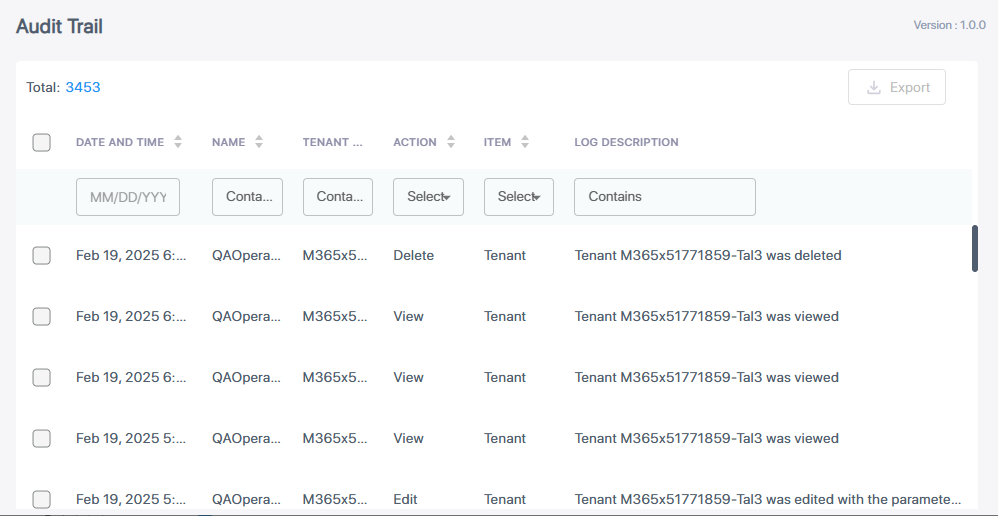
The information displayed in the table is described below:
|
Column |
Decsription |
|---|---|
|
Date and Time |
Date and time of logged action. |
|
Name |
Name of user that performed the action. |
|
Tenant Name |
Name of tenant. |
|
Action |
Type of action performed (e.g., add, delete, edit, or view). |
|
Item |
Who performed the action (tenant or user). |
|
Log Description |
Description of the action. |
| 3. | To download the audit trail of a tenant to your PC as a .csv file: |
| a. | Select the check box of the tenant. |
| b. | Click the Export button. |