View Licensing Usage
The Licenses page displays licensing information for Interaction Insights recording licenses purchased.
| ➢ | To access this page: |
| ■ | In the Icon pane, click  , and then in the Navigation pane, select System Settings > Licenses. , and then in the Navigation pane, select System Settings > Licenses. |
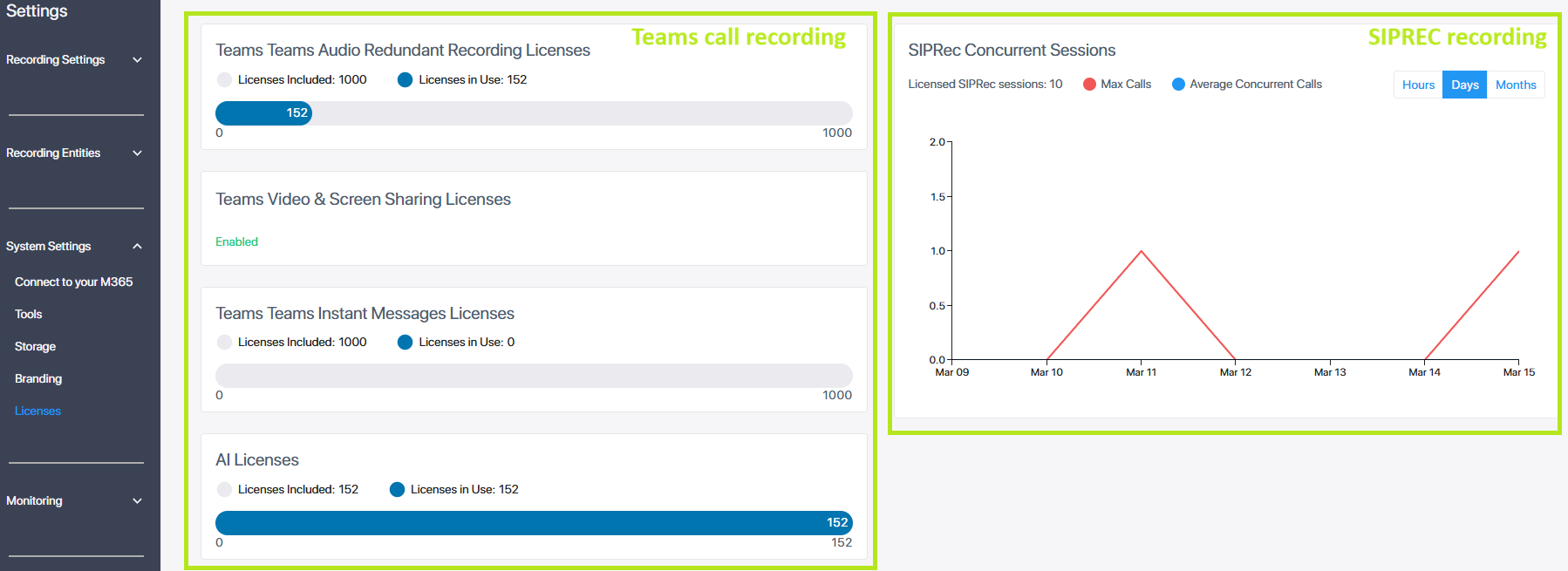
For an explanation of the displayed details, see below:
| ■ | Microsoft Teams Call Recording Licenses |
| ■ | SIPREC Recording Licenses |
For SIPREC-only systems, the dashboard displays only the SIPREC recording graph. If AI Licensing is enabled for your Interaction Insights tenant through the Tenant Management portal, AI license details are also displayed..
Microsoft Teams Call Recording Licenses
For Microsoft Teams call recording, this page displays the number of licenses that were initially configured in the Quick Start wizard and the number of targeted users belonging to Azure groups that are attached to Recording profiles, and the number of remaining licenses. In the figure below, 10000 licenses were configured in the wizard, and there are 152 licensed users belonging to attached Azure groups. When Entra ID groups are updated or associations with Recording Profiles are changed, the License utilization data displayed is synchronized.
For Teams call recording, the License page displays the number of licenses that were initially configured in the Quick Start wizard, the number of Targeted users belonging to Azure groups that are attached to Recording profiles, and the number of remaining licenses. In the figure below, 10000 licenses were configured in the wizard, there are 152 licensed users belonging to attached Azure groups.
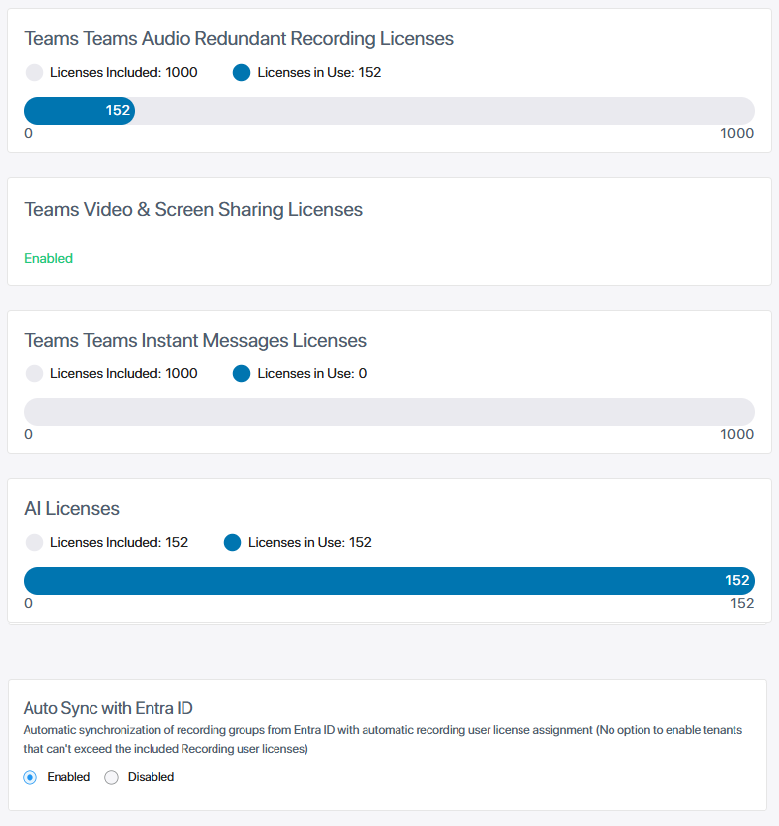
| ● | The Instant Messages and AI licenses appear only if enabled for the tenant (in the Tenant Management portal). |
| ● | If the Video and Screen Sharing Licenses are enabled, an indication is displayed. |
| ● | The Auto Sync with Entra ID option is only displayed if the Allow to Exceed Included Users feature has been enabled for the tenant. |
License data is displayed for Audio Redundant, Instant Messages, Video & Screen Sharing, and AI Summary licenses features. The table below describes the license data for each feature.
|
License Parameter |
Description |
||||||
|---|---|---|---|---|---|---|---|
|
Licenses Included |
Total number of user licenses allocated to the tenant. |
||||||
|
Licenses in Use |
Total number of active user licenses. |
||||||
|
Auto Sync with Entra ID |
Only displayed if the tenant is allowed to exceed the number of licensed users.
|
SIPREC Recording Licenses
For SIPREC call recording, customers are charged based on the number of allowed concurrent recordings. If all devices involved in a call are associated with a device recording profile, a separate recording of the call will be made for each device and counted for licensing. By contrast, the number of devices for which recording is enabled is not restricted by the license, as long as they are not being recorded.
The License page displays a graph showing the maximum and average numbers of concurrent recordings within a given time range. This range can be:
| ■ | Hourly resolution, for the last 24 hours. |
| ■ | Daily resolution (default), for the last 7 days. |
| ■ | Monthly resolution, for the last 12 months. |
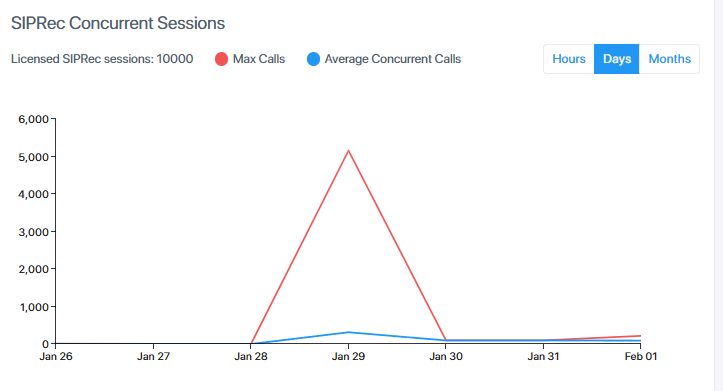
If the number of concurrent recording requests exceeds the maximum allowed number and requests are rejected, the rejected requests are not included in the graph.
If enabled for the tenant, the License page also displays AI license details.