Delete a Meeting Recording
You can delete any of your meeting recordings.
Only the Owner, Co-owner, or users assigned editing privileges of the meeting recording can delete the meeting recording.
|
➢
|
To delete a meeting recording: |
|
1.
|
In the Navigation pane, go to any meeting recording list view that contains the recording you want. |
|
2.
|
Do one of the following: |
|
●
|
Meeting Recording List View:
|
|
i.
|
Click the  icon of the meeting recording, and then from the drop-down menu, choose Delete; a confirmation message appears. icon of the meeting recording, and then from the drop-down menu, choose Delete; a confirmation message appears. |
|
i.
|
Click the meeting recording name; the Player page appears. |
|
ii.
|
On the toolbar located on the top of the page, click the  icon, and then from the drop-down menu, choose Delete Meeting: icon, and then from the drop-down menu, choose Delete Meeting: |
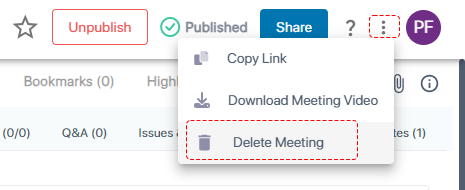
A confirmation message appears.