Manage Devices
The Devices page displays SIP devices for which calls can be recorded using SIPREC if this feature is enabled and they have been linked to a device recording profile via a device group.
Managing devices consists of:
| ■ | Add a Device |
| ■ | Modify a Device |
| ■ | Export Devices |
| ■ | Delete a Device |
See also:
| ■ | Manage Device Groups |
| ■ | Device Recording Profiles |
| ➢ | To access the Devices page: |
| ■ | In the Icon pane, click  , and then in the Navigation pane, select Recording Entities > Devices. , and then in the Navigation pane, select Recording Entities > Devices. |
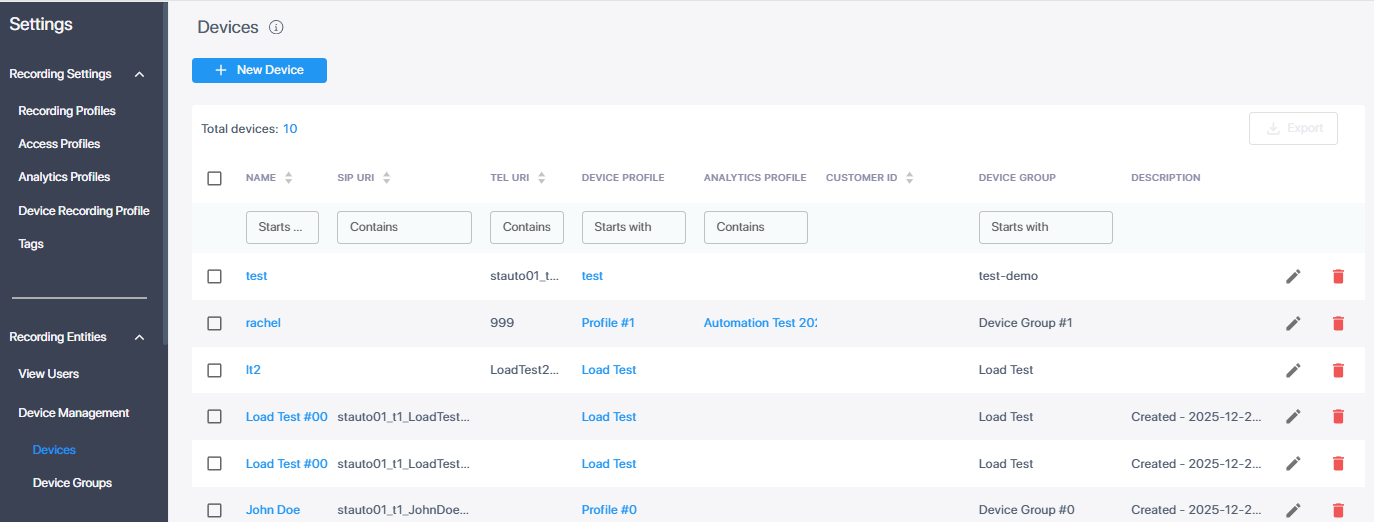
Below is a description of the parameters specified in the Devices table. You can sort this table by Name, SIP URI, or Tel URI.
|
Field |
Description |
|---|---|
|
Name |
The name of the device. |
|
SIP URI |
The unique SIP endpoint address of the device. |
|
TEL URI |
The device's unique telephone number. |
|
Device Profile |
Device recording profile applicable for the device. |
|
Analytics Profile |
Analytics profile applicable for the device (required for transcription and AI summary generation). |
|
Customer ID |
[Currently not in use] |
|
Device Group |
The device group to which the device is assigned. |
|
Description |
Description of the device. |