Add a Meeting Insights Service
You can add the following Meeting Insights service types:
| ■ | Meeting Insights: Adds a global Meeting Insights service for use by all tenants on the Live Platform instance. |
| ■ | Dedicated Meeting Insights: Adds a dedicated Meeting Insights service for a specific provider on the Live Platform instance. |
| ➢ | To deploy a Meeting Insights service: |
| 1. | Open the Customers page (Topology > Customers). |
| 2. | Select the customer, click the Add Service button, and then from the drop-down list, choose Meeting Insights; the Commercial Information dialog box appears. This dialog box only appears if enabled for the tenant (see Enabling Commercial Information for Services). |
| 3. | In the Commercial Information dialog box (if enabled to appear), fill in the commercial information fields, select the Click to approve check box to agree to the terms and conditions, and then click Add Service; the Tenant Management portal of Meeting Insights opens, displaying the New Meeting Insights Tenant form: |
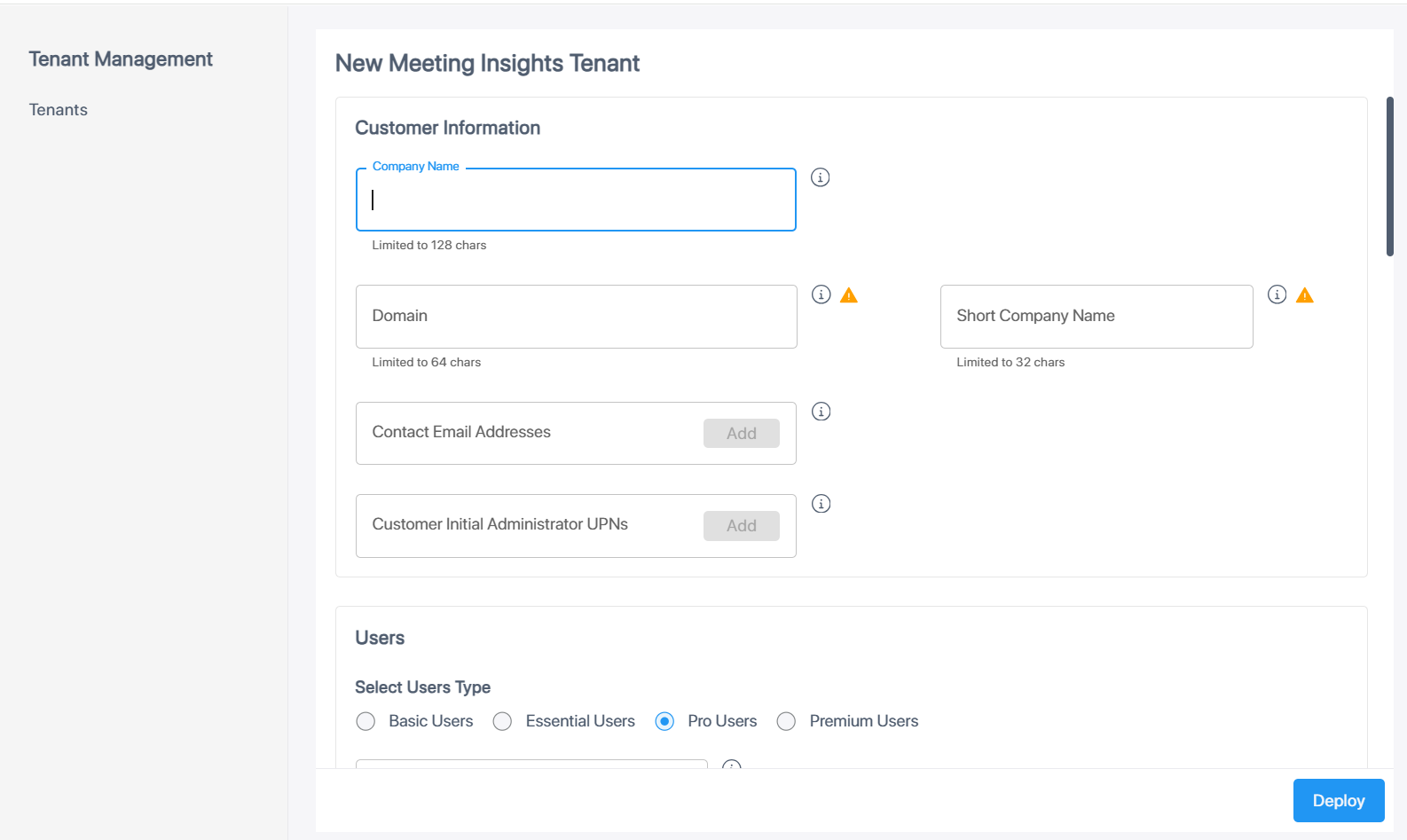
The  icon indicates that once you configure the field, you can't change it. If you want to change the field's setting, you need to delete the Meeting Insights tenant and create a new tenant again.
| 4. | Fill in the form according to the parameters described in the following table: |
|
Parameter |
Description |
|||||||||||||||||||||||||||||||||||||||||||||||||||
|---|---|---|---|---|---|---|---|---|---|---|---|---|---|---|---|---|---|---|---|---|---|---|---|---|---|---|---|---|---|---|---|---|---|---|---|---|---|---|---|---|---|---|---|---|---|---|---|---|---|---|---|---|
|
Customer Information |
||||||||||||||||||||||||||||||||||||||||||||||||||||
|
Company Name |
Type a unique name for the Microsoft 365 tenant (up to 128 characters). |
|||||||||||||||||||||||||||||||||||||||||||||||||||
|
Domain |
Type a unique domain (up to 64 characters), for example, "companyname.com". |
|||||||||||||||||||||||||||||||||||||||||||||||||||
|
Short Company Name |
Type a unique short company name. The name must adhere to the following rules:
|
|||||||||||||||||||||||||||||||||||||||||||||||||||
|
Contact Email Addresses |
Type the email addresses of those in the company who can be contacted and will receive the email notifications. Click Add after each entry. |
|||||||||||||||||||||||||||||||||||||||||||||||||||
|
Customer Initial Administrator UPNs |
Type the user principal names (UPN). Each comprises the UPN prefix (user account name) and UPN suffix (DNS domain name). The prefix is joined with the suffix using the "@" symbol. For example, "someone@example.com". For the full access default administrator, users are able to access the Meeting Insights application and set it up for the organization. Click Add after each entry. |
|||||||||||||||||||||||||||||||||||||||||||||||||||
|
Users |
||||||||||||||||||||||||||||||||||||||||||||||||||||
|
Select Users Type |
Select the type of Meeting Insights license purchased by the Customer:
For a description of the license-based features, see License-Based Features. |
|||||||||||||||||||||||||||||||||||||||||||||||||||
|
Included Users |
Type the number of licensed users to include in the tenant. The Purchase Order (PO) indicates the number. |
|||||||||||||||||||||||||||||||||||||||||||||||||||
|
Storage |
||||||||||||||||||||||||||||||||||||||||||||||||||||
|
Location |
From the drop-down list, select the region where meeting recordings' media and insights are stored. |
|||||||||||||||||||||||||||||||||||||||||||||||||||
|
Bring Your AWS S3 Storage (BYOS) |
Enables the BYOS feature, which allows the tenant to use its own Amazon Web Services (AWS) storage account (Amazon S3 buckets) for meeting recordings' media and insights. |
|||||||||||||||||||||||||||||||||||||||||||||||||||
|
STT Engines |
||||||||||||||||||||||||||||||||||||||||||||||||||||
|
AudioCodes (Local) |
Defines the language for which you want to use the third-party, speech-to-text provider that's located on AudioCodes local cloud. Note: Currently, only Hebrew language is supported. |
|||||||||||||||||||||||||||||||||||||||||||||||||||
|
AudioCodes (Cloud) |
Defines the languages for which you want to use the third-party, speech-to-text provider that's located in the provider's cloud platform.
Note: If you selected Hebrew for AudioCodes (Local), you can't select it. |
|||||||||||||||||||||||||||||||||||||||||||||||||||
|
MSFT |
Selects the Microsoft speech-to-text language option:
Note: If you selected Hebrew for AudioCodes (Local), you can't select it for MSFT. |
|||||||||||||||||||||||||||||||||||||||||||||||||||
|
Extend Retention Policy |
||||||||||||||||||||||||||||||||||||||||||||||||||||
|
Extend Allowed Retention Period |
Enables users to extend the retention period of a meeting recording. |
|||||||||||||||||||||||||||||||||||||||||||||||||||
|
API Integration |
||||||||||||||||||||||||||||||||||||||||||||||||||||
|
- |
Enables the tenant to integrate Meeting Insights with a third-party API client application. |
|||||||||||||||||||||||||||||||||||||||||||||||||||
|
Notes |
||||||||||||||||||||||||||||||||||||||||||||||||||||
|
Text |
Provides any special notes about the tenant. |
|||||||||||||||||||||||||||||||||||||||||||||||||||
|
Advanced Storage |
||||||||||||||||||||||||||||||||||||||||||||||||||||
|
Geographical Redundancy Storage |
Enables geographical redundancy storage (GRS) in a paired region for data disaster recovery, to protect call recording data from disruptions that may occur in one location. |
|||||||||||||||||||||||||||||||||||||||||||||||||||
|
GRS Storage Included |
From the drop-down list, select the GRS storage in Gigabytes (GB). |
|||||||||||||||||||||||||||||||||||||||||||||||||||
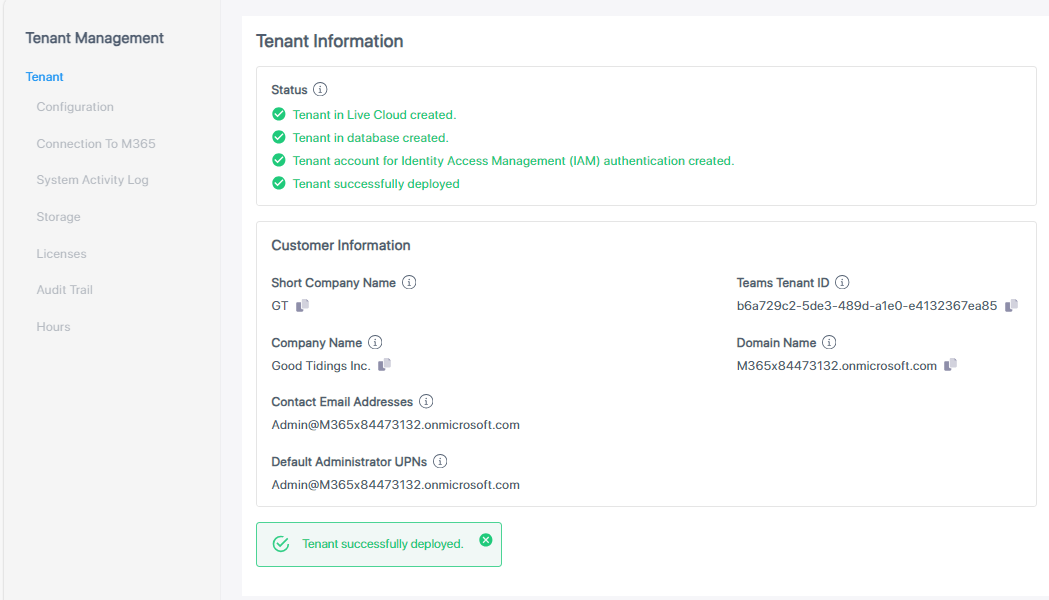
| 1. | Click Deploy; Live Platform starts creating and processing the tenant. The progress is displayed under the Status group. |
| 2. | Wait until all statuses are completed successfully and the "Tenant successfully deployed" message is displayed, as shown in the following example: |
| 3. | Click Close; an email is sent to the tenant's email address (as provided above), informing that Meeting Insights is ready for use and that certain actions need to be done before Meeting Insights can be used by the customer. For more information, see Email Sent to Onboarded Customer. |