Edit the Transcription of a Highlight
You can edit the transcription of highlights. This may be necessary if the transcription has some errors such as typos or grammar mistakes.
Only the Owner, Co-owner, or users assigned editing privileges of the meeting recording can edit a highlight's transcription.
|
➢
|
To edit transcription of a highlight: |
|
1.
|
In the Navigation pane, go to any meeting recording list view that contains the recording you want. |
|
2.
|
Click the meeting recording name; the Player page appears. |
|
3.
|
Select the Highlights tab; the list of highlights are displayed. |
|
4.
|
Click the title of the highlight that you want; the highlight's transcription is displayed. |
|
5.
|
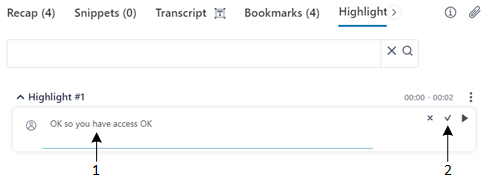
Right-click the transcription (#1 in figure) to enter the edit mode, and then edit the transcription as desired: |
|
6.
|
Click (#2 in figure) to apply your changes. (#2 in figure) to apply your changes. |