Find Text in Highlights
You can search for specific text strings in highlights of a meeting recording.
| ➢ | To search for text in highlights: |
| 1. | In the Navigation pane, go to any meeting recording list view that contains the recording you want. |
| 2. | Click the meeting recording name; the Player page appears. |
| 3. | Select the Highlights tab. |
| 4. | In the search field (#1 in figure), type the text string that you want to search, and then click  (#3 in figure); only the highlights containing the searched string are shown (all others are hidden). In addition, if you open the highlight, the searched string is highlighted in yellow, as shown in the following example: (#3 in figure); only the highlights containing the searched string are shown (all others are hidden). In addition, if you open the highlight, the searched string is highlighted in yellow, as shown in the following example: |
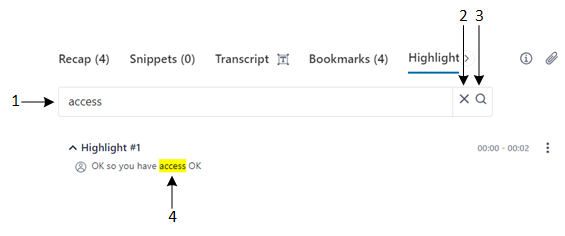
Legend:
1 = Search field
2 = Clear search
3 = Apply search
4 = Highlighted occurrences of searched string
| 5. | To clear your search, click  (#2 in figure). (#2 in figure). |