View Sent Recap in Third-Party App
After you send a meeting recording’s recap content to a third-party app (e.g., Confluence), you can open it directly from the listed meeting recording. This lets you check what was sent and where it went.
| ➢ | To view sent recap content in a third-party app: |
| 1. | In the Navigation pane, open a meeting recording list view that contains the meeting recording. |
| 2. | Below the meeting recording name, click the icon of the third-party app: |
 Confluence
 Jira
 HubSpot
 monday.com
 Salesforce
 Spark Hire Recruit
A pop-up window appears, listing destinations in the third-party app where recap content was sent, as shown in the following example for Confluence:
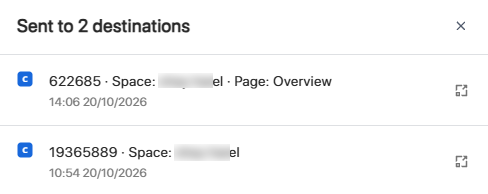
| 3. | Click the Open  icon next to the destination; the third-party app opens in a new web browser tab and shows the recap content in the destination you selected. |